> ## Documentation Index
> Fetch the complete documentation index at: https://docs.formo.so/llms.txt
> Use this file to discover all available pages before exploring further.
# Contract events
> Add contracts to ingest and decode onchain events like swaps, transfers, and mints in real time across supported EVM chains.
Add your contract in the project settings page to start ingesting contract events.
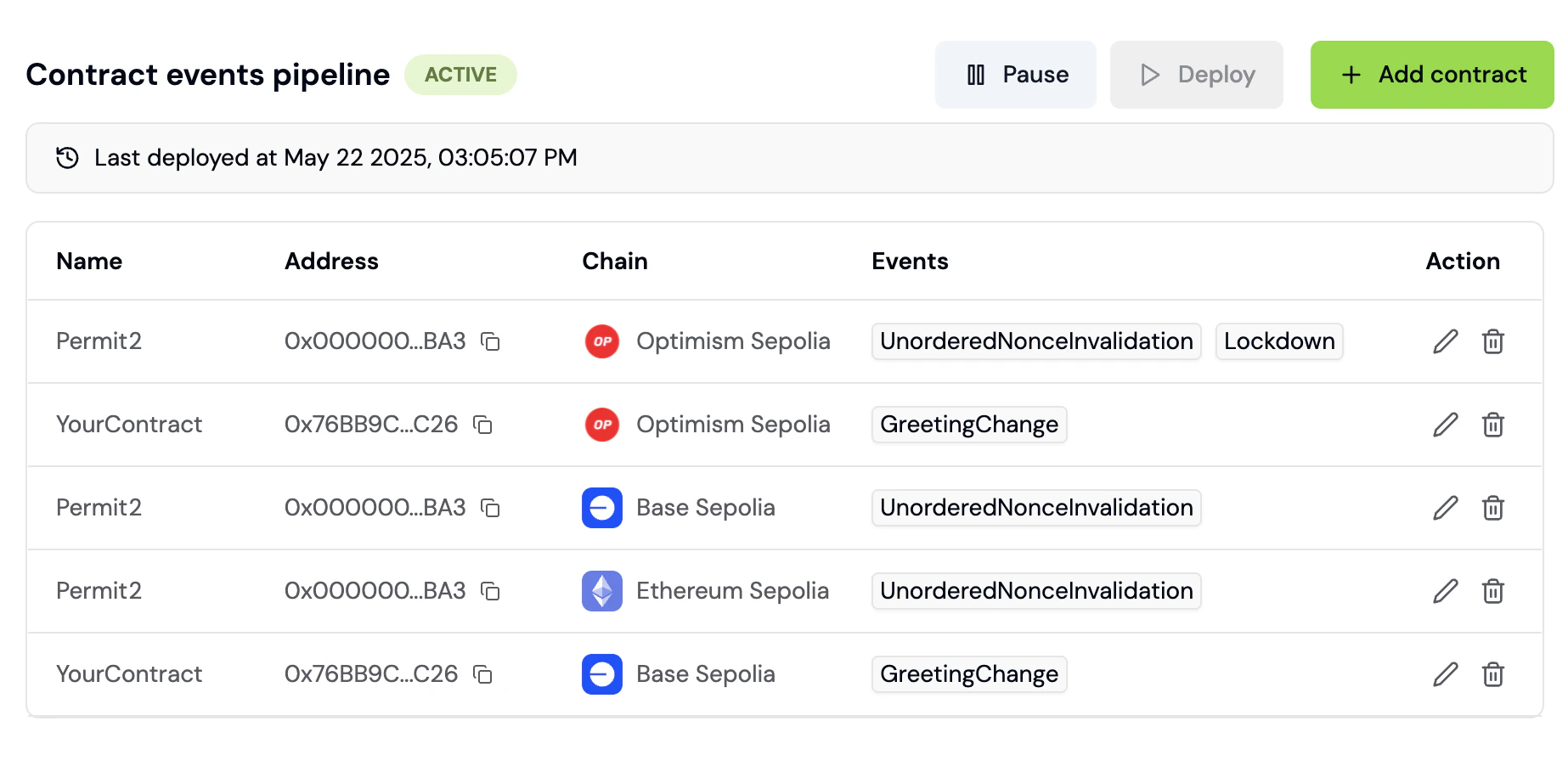 Once ingested, you will see contract events on the [Activity Feed](/features/product-analytics/activity) and [Wallet Profile](/features/wallet-intelligence/wallet-profiles) in real time.
Contract events can be used as steps when creating [Funnels](/features/product-analytics/funnels).
***
## How to track smart contract events
Monitor your smart contract activity in real time. This guide walks you through adding contracts, selecting events, and using contract data in analytics.
### Step 1: Navigate to Project Settings page
1. Go to the [Formo Dashboard](https://app.formo.so)
2. Select your project
3. Click **Settings** in the left navigation
4. Select the **Contracts** tab
### Step 2: Add a contract and select events to track
1. Click **Add Contract**
2. Fill in the contract details:
| Field | Description | Example |
| - | - | - |
| **Chain** | The blockchain network | Ethereum, Base, Arbitrum |
| **Contract Address** | Your contract's address | `0x1234...abcd` |
| **Name** | Friendly name for reference. Auto-filled from the verified contract source when available; edit if you want a different label. | "Swap Router" |
| **ABI** | Required to decode events. Formo automatically fetches it once the address and chain are set (Etherscan, then Sourcify as a fallback); paste it manually if auto-detection fails. | |
3. Switch on the **Ingest contract events** toggle to reveal the list of available events from the ABI
4. Toggle on the events you want to track
5. Click **Add contract**
Once ingested, you will see contract events on the [Activity Feed](/features/product-analytics/activity) and [Wallet Profile](/features/wallet-intelligence/wallet-profiles) in real time.
Contract events can be used as steps when creating [Funnels](/features/product-analytics/funnels).
***
## How to track smart contract events
Monitor your smart contract activity in real time. This guide walks you through adding contracts, selecting events, and using contract data in analytics.
### Step 1: Navigate to Project Settings page
1. Go to the [Formo Dashboard](https://app.formo.so)
2. Select your project
3. Click **Settings** in the left navigation
4. Select the **Contracts** tab
### Step 2: Add a contract and select events to track
1. Click **Add Contract**
2. Fill in the contract details:
| Field | Description | Example |
| - | - | - |
| **Chain** | The blockchain network | Ethereum, Base, Arbitrum |
| **Contract Address** | Your contract's address | `0x1234...abcd` |
| **Name** | Friendly name for reference. Auto-filled from the verified contract source when available; edit if you want a different label. | "Swap Router" |
| **ABI** | Required to decode events. Formo automatically fetches it once the address and chain are set (Etherscan, then Sourcify as a fallback); paste it manually if auto-detection fails. | |
3. Switch on the **Ingest contract events** toggle to reveal the list of available events from the ABI
4. Toggle on the events you want to track
5. Click **Add contract**
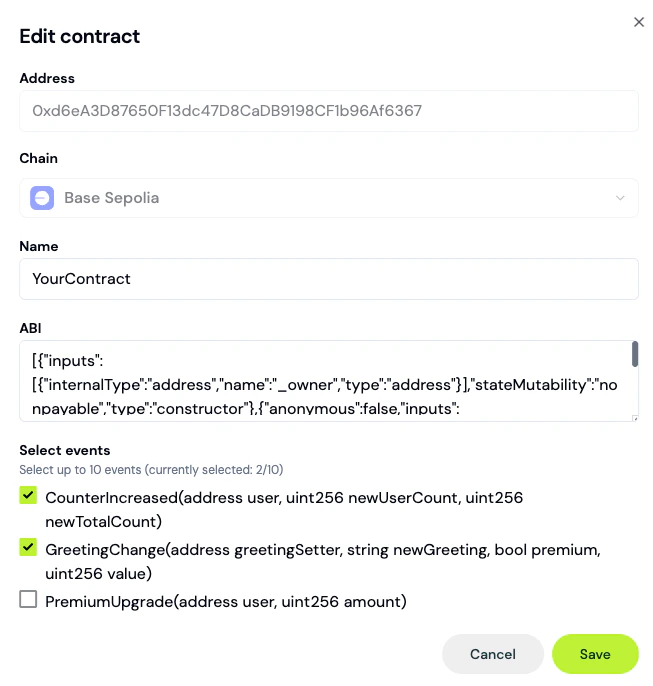 For verified contracts, Formo auto-detects the ABI. For unverified contracts, you can paste the ABI manually. You can also come back and change your event selection later by reopening the contract from the list.
### Step 3: Deploy the pipeline
Selecting events and saving the contract doesn't start ingestion by itself; the events pipeline needs to be deployed.
1. In the Contracts settings page, click **Deploy** (or **Redeploy** if a pipeline is already live)
2. Track progress via the pipeline status badge: **Draft**, **Live**, **Paused**, **Inactive**, or **Error**
See the [contract events guide](/guides/contract-events#pipeline-management) for details on managing pipeline state.
### Step 4: View events in Activity Feed
Once the pipeline is live, contract events appear in your Activity Feed:
1. Go to **Activity** in the left navigation
2. Filter by the **Contract event** event type to see contract events
3. Click any event to see decoded parameters including transaction hash, block number, function name and function parameters
### Step 5: Use contract events in funnels
Build funnels that include onchain actions:
1. Go to **Funnels** and click **Create Funnel**
2. Add steps mixing offchain and onchain events:
* Step 1: `page` view (visit homepage)
* Step 2: `connect` (connect wallet)
* Step 3: `transaction` (successful tx)
* Step 4: `SwapCompleted` (contract event)
This gives you true end-to-end conversion tracking from first visit offchain to conversions onchain.
### Example: DEX swap tracking
Track user journey from landing page to completed swap:
| Step | Event Type | Description |
| - | - | - |
| 1 | `page` | User lands on /swap |
| 2 | `connect` | User connects wallet |
| 3 | Contract: `Approval` | User approves token |
| 4 | Contract: `Swap` | Swap executed |
This documentation is built and hosted on [Mintlify](https://mintlify.com), a developer documentation platform.
For verified contracts, Formo auto-detects the ABI. For unverified contracts, you can paste the ABI manually. You can also come back and change your event selection later by reopening the contract from the list.
### Step 3: Deploy the pipeline
Selecting events and saving the contract doesn't start ingestion by itself; the events pipeline needs to be deployed.
1. In the Contracts settings page, click **Deploy** (or **Redeploy** if a pipeline is already live)
2. Track progress via the pipeline status badge: **Draft**, **Live**, **Paused**, **Inactive**, or **Error**
See the [contract events guide](/guides/contract-events#pipeline-management) for details on managing pipeline state.
### Step 4: View events in Activity Feed
Once the pipeline is live, contract events appear in your Activity Feed:
1. Go to **Activity** in the left navigation
2. Filter by the **Contract event** event type to see contract events
3. Click any event to see decoded parameters including transaction hash, block number, function name and function parameters
### Step 5: Use contract events in funnels
Build funnels that include onchain actions:
1. Go to **Funnels** and click **Create Funnel**
2. Add steps mixing offchain and onchain events:
* Step 1: `page` view (visit homepage)
* Step 2: `connect` (connect wallet)
* Step 3: `transaction` (successful tx)
* Step 4: `SwapCompleted` (contract event)
This gives you true end-to-end conversion tracking from first visit offchain to conversions onchain.
### Example: DEX swap tracking
Track user journey from landing page to completed swap:
| Step | Event Type | Description |
| - | - | - |
| 1 | `page` | User lands on /swap |
| 2 | `connect` | User connects wallet |
| 3 | Contract: `Approval` | User approves token |
| 4 | Contract: `Swap` | Swap executed |
This documentation is built and hosted on [Mintlify](https://mintlify.com), a developer documentation platform.