> ## Documentation Index
> Fetch the complete documentation index at: https://docs.formo.so/llms.txt
> Use this file to discover all available pages before exploring further.
# Insights
> Receive AI-powered insights that surface acquisition quality, revenue trends, and churn signals from your analytics data.
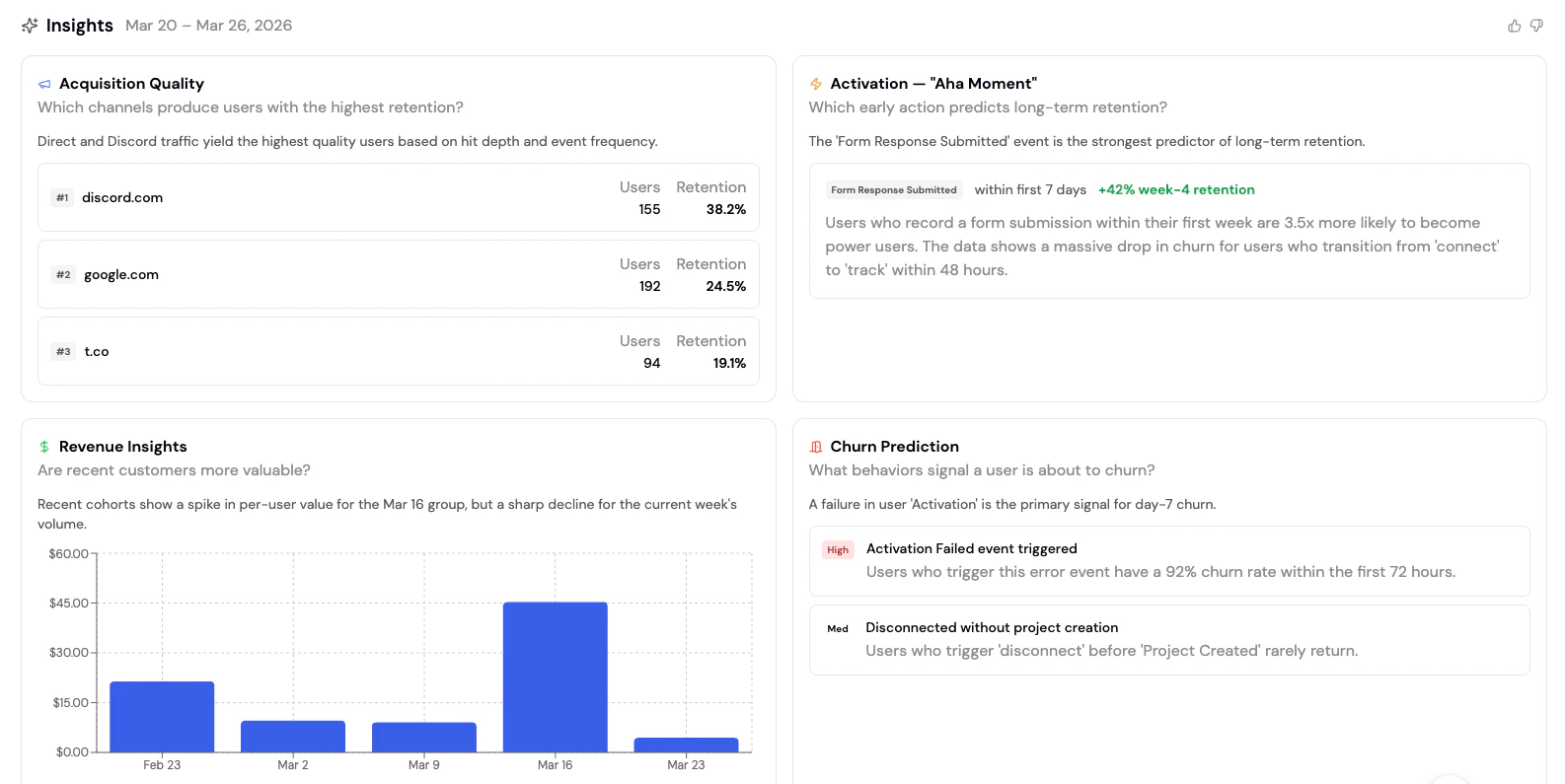
Insights runs AI-powered cohort analysis on your data, surfacing findings across acquisition, revenue, and churn.
 ## Wins, Issues, and Opportunities
In addition to cohort analysis, the Insights page provides a summary organized into three sections:
* 🏆 **Wins** - Metrics that improved recently, with deltas and baselines
* ⚠️ **Issues** - Performance drops or problems that need attention
* 📈 **Opportunities** - Untapped segments or behaviors with estimated upside
## Cohort Analysis
Insights runs a cohort analysis that answers three key questions about your users:
### Acquisition Quality
**Which channels bring in the most valuable users?**
Acquisition Quality ranks your traffic sources by the visitors, wallets, and transactions they bring in, so you can quickly see which channels drive real activity rather than just traffic volume.
Each channel shows:
| Column | Description |
| - | - |
| **Channel** | The traffic source (e.g., discord.com, google.com, t.co) |
| **Visitors** | Number of visitors from this channel |
| **Wallets** | Number of wallets connected from this channel |
| **Transactions** | Number of onchain transactions from users acquired via this channel |
Use this to shift acquisition spend toward channels that produce real onchain activity, not just visits.
### Revenue Insights
**Is revenue, volume, or points growing week over week?**
Revenue Insights tracks whichever value metric your project actually records (revenue, transaction volume, or points) over the last 7 days versus the prior 7, using whichever has the strongest signal if more than one is tracked.
The chart displays:
* **Weeks** on the x-axis
* **Total value for that week** (revenue, volume, or points) on the y-axis
* **Trend analysis** highlighting spikes and declines
### Churn Prediction
**What behaviors signal a user is about to churn?**
Churn Prediction surfaces early warning signals: specific user behaviors that precede churn. Each signal includes a risk level and a description of what the data shows.
| Column | Description |
| - | - |
| **Behavior** | The action or pattern that precedes churn |
| **Risk Level** | High, Medium, or Low severity |
| **Description** | What the data shows about this signal |
For example:
* **High risk**: "Users who trigger an error event have a 92% churn rate within the first 72 hours"
* **Medium risk**: "Users who disconnect before completing onboarding rarely return"
## How to use Insights
1. Navigate to the [Formo Dashboard](https://app.formo.so)
2. Select your project
3. Click **Insights** in the left navigation (✨ sparkle icon)
4. Review the latest analysis and take action
Insights are generated the first time you open the page each day, then cached for the rest of that day. Reopening the page later that same day shows the cached report; your next visit on a new day generates a fresh one.
## Combining Insights with other features
| Insight | Follow-up action |
| - | - |
| **Low-quality acquisition channel** | Create a [segment](/features/wallet-intelligence/segments) of users from that channel to investigate |
| **Revenue decline week over week** | Use [retention analysis](/features/product-analytics/retention) to understand drop-off patterns |
| **High churn signal detected** | Set up an [alert](/features/product-analytics/alerts) to notify you when users exhibit that behavior |
| **Behavioral gap between power and casual users** | Explore the gap using [Ask AI](/features/product-analytics/ai) or the [Explorer](/features/product-analytics/explore) |
This documentation is built and hosted on [Mintlify](https://mintlify.com), a developer documentation platform.
## Wins, Issues, and Opportunities
In addition to cohort analysis, the Insights page provides a summary organized into three sections:
* 🏆 **Wins** - Metrics that improved recently, with deltas and baselines
* ⚠️ **Issues** - Performance drops or problems that need attention
* 📈 **Opportunities** - Untapped segments or behaviors with estimated upside
## Cohort Analysis
Insights runs a cohort analysis that answers three key questions about your users:
### Acquisition Quality
**Which channels bring in the most valuable users?**
Acquisition Quality ranks your traffic sources by the visitors, wallets, and transactions they bring in, so you can quickly see which channels drive real activity rather than just traffic volume.
Each channel shows:
| Column | Description |
| - | - |
| **Channel** | The traffic source (e.g., discord.com, google.com, t.co) |
| **Visitors** | Number of visitors from this channel |
| **Wallets** | Number of wallets connected from this channel |
| **Transactions** | Number of onchain transactions from users acquired via this channel |
Use this to shift acquisition spend toward channels that produce real onchain activity, not just visits.
### Revenue Insights
**Is revenue, volume, or points growing week over week?**
Revenue Insights tracks whichever value metric your project actually records (revenue, transaction volume, or points) over the last 7 days versus the prior 7, using whichever has the strongest signal if more than one is tracked.
The chart displays:
* **Weeks** on the x-axis
* **Total value for that week** (revenue, volume, or points) on the y-axis
* **Trend analysis** highlighting spikes and declines
### Churn Prediction
**What behaviors signal a user is about to churn?**
Churn Prediction surfaces early warning signals: specific user behaviors that precede churn. Each signal includes a risk level and a description of what the data shows.
| Column | Description |
| - | - |
| **Behavior** | The action or pattern that precedes churn |
| **Risk Level** | High, Medium, or Low severity |
| **Description** | What the data shows about this signal |
For example:
* **High risk**: "Users who trigger an error event have a 92% churn rate within the first 72 hours"
* **Medium risk**: "Users who disconnect before completing onboarding rarely return"
## How to use Insights
1. Navigate to the [Formo Dashboard](https://app.formo.so)
2. Select your project
3. Click **Insights** in the left navigation (✨ sparkle icon)
4. Review the latest analysis and take action
Insights are generated the first time you open the page each day, then cached for the rest of that day. Reopening the page later that same day shows the cached report; your next visit on a new day generates a fresh one.
## Combining Insights with other features
| Insight | Follow-up action |
| - | - |
| **Low-quality acquisition channel** | Create a [segment](/features/wallet-intelligence/segments) of users from that channel to investigate |
| **Revenue decline week over week** | Use [retention analysis](/features/product-analytics/retention) to understand drop-off patterns |
| **High churn signal detected** | Set up an [alert](/features/product-analytics/alerts) to notify you when users exhibit that behavior |
| **Behavioral gap between power and casual users** | Explore the gap using [Ask AI](/features/product-analytics/ai) or the [Explorer](/features/product-analytics/explore) |
This documentation is built and hosted on [Mintlify](https://mintlify.com), a developer documentation platform.