> ## Documentation Index
> Fetch the complete documentation index at: https://docs.formo.so/llms.txt
> Use this file to discover all available pages before exploring further.
# Retention
> Measure user retention with cohort analysis to identify which user groups return over time, track stickiness, and spot churn patterns in your onchain app.
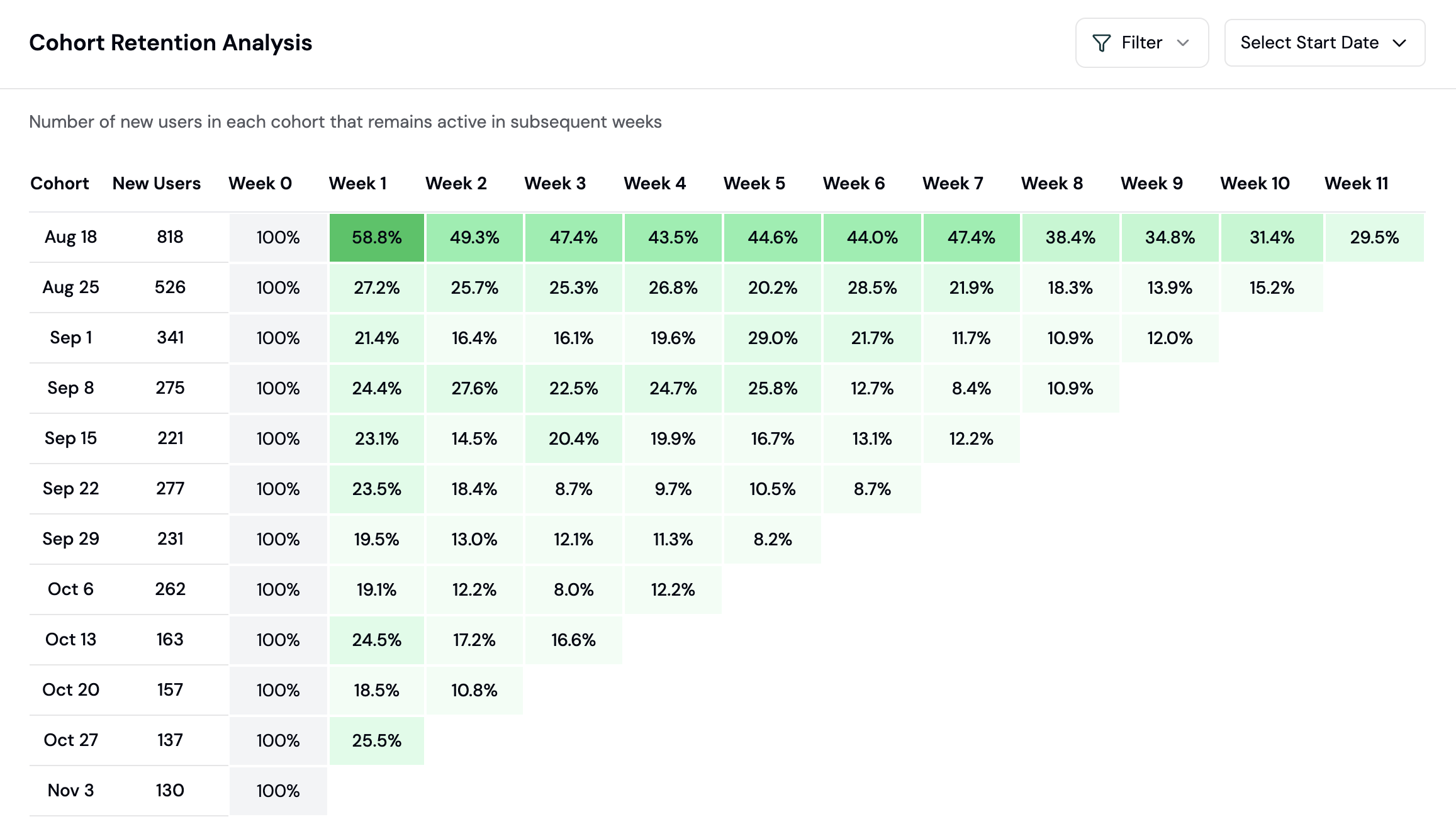 Understanding user retention and engagement allows you to identify which user cohorts are more likely to take specific actions within a given time period.
You can select which event to use to calculate week-on-week user retention. This gives product teams better insight into retention rates for specific features and user flows.
For example, measure retention based on:
* Transaction completions
* Feature usage
* Wallet connections
* [Custom events](/features/product-analytics/custom-events) specific to your app
***
## How to analyze user retention
Retention analysis shows how many users come back to your app over time. This guide walks you through reading retention charts and improving user stickiness.
### What is a cohort retention chart?
A cohort is a group of users who started using your app in the same time period (e.g., users who first connected in Week 1). Retention tracks what percentage of each cohort returns in subsequent weeks.
| Week 0 | Week 1 | Week 2 | Week 3 | Week 4 |
| - | - | - | - | - |
| 100% | 40% | 25% | 20% | 18% |
This example shows: of users who started in Week 0, 40% returned in Week 1, 25% in Week 2, etc.
### Step 1: Create a Retention chart
Retention is a chart type you add to a dashboard (board), not a separate nav page.
1. Go to the [Formo Dashboard](https://app.formo.so)
2. Select your project
3. Open **Dashboards** in the left navigation, then open or create a board
4. Click **Add Chart** and choose the **Retention** chart type
### Step 2: Choose the entry and retention events
Configure how cohorts are formed and what counts as "coming back":
| Setting | What it does |
| - | - |
| **Entry event** | Defines the cohort: users are grouped by the week they first performed this event (defaults to wallet connect; "Any event" groups everyone) |
| **Retention event** | The action that counts as returning in a later week (e.g. `connect`, `transaction`, `page`, or a custom event; "Any event" counts any activity) |
| **Retention type** | **Rolling** (default): a user counts toward week N if active in week N or any later week, giving a smooth curve. **Recurring**: counts only if active in exactly week N, so the curve can dip and recover |
For crypto apps, `transaction` retention is usually the most meaningful metric because it shows who's actually using your app.
You can also narrow the cohort with the **Segment** filter: device, browser, OS, country, volume, revenue, points, referrer, referrer URL, referral, builder codes, or UTM parameters. Separately, a **cohort label filter** restricts the cohort to wallets that carried a given label as of their entry week. Alternatively, switch **Retention by** to **User label** to retain on a wallet label value (e.g. `open_interest > 10000`) instead of an event.
### Step 3: Read the retention matrix
The retention chart displays:
* **Rows**: Cohorts, grouped by start week, plus a pinned "Mean retention" row (the unweighted average across all visible cohorts)
* **Columns**: Weeks after the cohort's start (Week 0 through however many weeks have fully elapsed)
* **Cells**: Percentage of the cohort still active in that week
**Color coding:** cells shade from light to dark green as the retention percentage increases (darkest at 100%). Week 0 is always 100% by definition. Weeks whose observation window hasn't fully elapsed yet are shown blank or dashed rather than colored.
### Step 4: Identify patterns
**Healthy retention curve:**
* Sharp drop in Week 1 (normal)
* Gradual stabilization by Week 3-4
* Flat line after stabilization (loyal users)
**Concerning patterns:**
* Continuous decline without stabilization
* Large drop-offs in later weeks
* Significant variance between cohorts
### Step 5: Compare cohorts
Look for cohorts with better or worse retention:
**Questions to ask:**
* Did a product change improve retention for newer cohorts?
* Do users from certain campaigns retain better?
* Is there seasonal variation in retention?
### Improving retention
Based on your retention analysis:
**If Week 1 drop-off is too high:**
* Improve onboarding experience
* Send follow-up notifications
* Add incentives for early engagement
**If long-term retention is declining:**
* Add new features or content
* Implement re-engagement campaigns
* Analyze churned users for common patterns
**If certain cohorts retain better:**
* Identify what made them different
* Replicate successful acquisition channels
* Apply learnings to current users
### Using retention with other features
| Feature | How to combine |
| - | - |
| **Segments** | Create segments of retained vs. churned users |
| **Funnels** | Measure conversion for retained users |
| **Alerts** | Notify when an at-risk or churned user re-engages (lifecycle = Resurrected) |
| **Wallet Profiles** | Investigate high-retention users |
This documentation is built and hosted on [Mintlify](https://mintlify.com), a developer documentation platform.
Understanding user retention and engagement allows you to identify which user cohorts are more likely to take specific actions within a given time period.
You can select which event to use to calculate week-on-week user retention. This gives product teams better insight into retention rates for specific features and user flows.
For example, measure retention based on:
* Transaction completions
* Feature usage
* Wallet connections
* [Custom events](/features/product-analytics/custom-events) specific to your app
***
## How to analyze user retention
Retention analysis shows how many users come back to your app over time. This guide walks you through reading retention charts and improving user stickiness.
### What is a cohort retention chart?
A cohort is a group of users who started using your app in the same time period (e.g., users who first connected in Week 1). Retention tracks what percentage of each cohort returns in subsequent weeks.
| Week 0 | Week 1 | Week 2 | Week 3 | Week 4 |
| - | - | - | - | - |
| 100% | 40% | 25% | 20% | 18% |
This example shows: of users who started in Week 0, 40% returned in Week 1, 25% in Week 2, etc.
### Step 1: Create a Retention chart
Retention is a chart type you add to a dashboard (board), not a separate nav page.
1. Go to the [Formo Dashboard](https://app.formo.so)
2. Select your project
3. Open **Dashboards** in the left navigation, then open or create a board
4. Click **Add Chart** and choose the **Retention** chart type
### Step 2: Choose the entry and retention events
Configure how cohorts are formed and what counts as "coming back":
| Setting | What it does |
| - | - |
| **Entry event** | Defines the cohort: users are grouped by the week they first performed this event (defaults to wallet connect; "Any event" groups everyone) |
| **Retention event** | The action that counts as returning in a later week (e.g. `connect`, `transaction`, `page`, or a custom event; "Any event" counts any activity) |
| **Retention type** | **Rolling** (default): a user counts toward week N if active in week N or any later week, giving a smooth curve. **Recurring**: counts only if active in exactly week N, so the curve can dip and recover |
For crypto apps, `transaction` retention is usually the most meaningful metric because it shows who's actually using your app.
You can also narrow the cohort with the **Segment** filter: device, browser, OS, country, volume, revenue, points, referrer, referrer URL, referral, builder codes, or UTM parameters. Separately, a **cohort label filter** restricts the cohort to wallets that carried a given label as of their entry week. Alternatively, switch **Retention by** to **User label** to retain on a wallet label value (e.g. `open_interest > 10000`) instead of an event.
### Step 3: Read the retention matrix
The retention chart displays:
* **Rows**: Cohorts, grouped by start week, plus a pinned "Mean retention" row (the unweighted average across all visible cohorts)
* **Columns**: Weeks after the cohort's start (Week 0 through however many weeks have fully elapsed)
* **Cells**: Percentage of the cohort still active in that week
**Color coding:** cells shade from light to dark green as the retention percentage increases (darkest at 100%). Week 0 is always 100% by definition. Weeks whose observation window hasn't fully elapsed yet are shown blank or dashed rather than colored.
### Step 4: Identify patterns
**Healthy retention curve:**
* Sharp drop in Week 1 (normal)
* Gradual stabilization by Week 3-4
* Flat line after stabilization (loyal users)
**Concerning patterns:**
* Continuous decline without stabilization
* Large drop-offs in later weeks
* Significant variance between cohorts
### Step 5: Compare cohorts
Look for cohorts with better or worse retention:
**Questions to ask:**
* Did a product change improve retention for newer cohorts?
* Do users from certain campaigns retain better?
* Is there seasonal variation in retention?
### Improving retention
Based on your retention analysis:
**If Week 1 drop-off is too high:**
* Improve onboarding experience
* Send follow-up notifications
* Add incentives for early engagement
**If long-term retention is declining:**
* Add new features or content
* Implement re-engagement campaigns
* Analyze churned users for common patterns
**If certain cohorts retain better:**
* Identify what made them different
* Replicate successful acquisition channels
* Apply learnings to current users
### Using retention with other features
| Feature | How to combine |
| - | - |
| **Segments** | Create segments of retained vs. churned users |
| **Funnels** | Measure conversion for retained users |
| **Alerts** | Notify when an at-risk or churned user re-engages (lifecycle = Resurrected) |
| **Wallet Profiles** | Investigate high-retention users |
This documentation is built and hosted on [Mintlify](https://mintlify.com), a developer documentation platform.