> ## Documentation Index
> Fetch the complete documentation index at: https://docs.formo.so/llms.txt
> Use this file to discover all available pages before exploring further.
# Form builder
> Build and customize token-gated forms, waitlists, and surveys for your web3 community with drag-and-drop fields and wallet-connected responses.
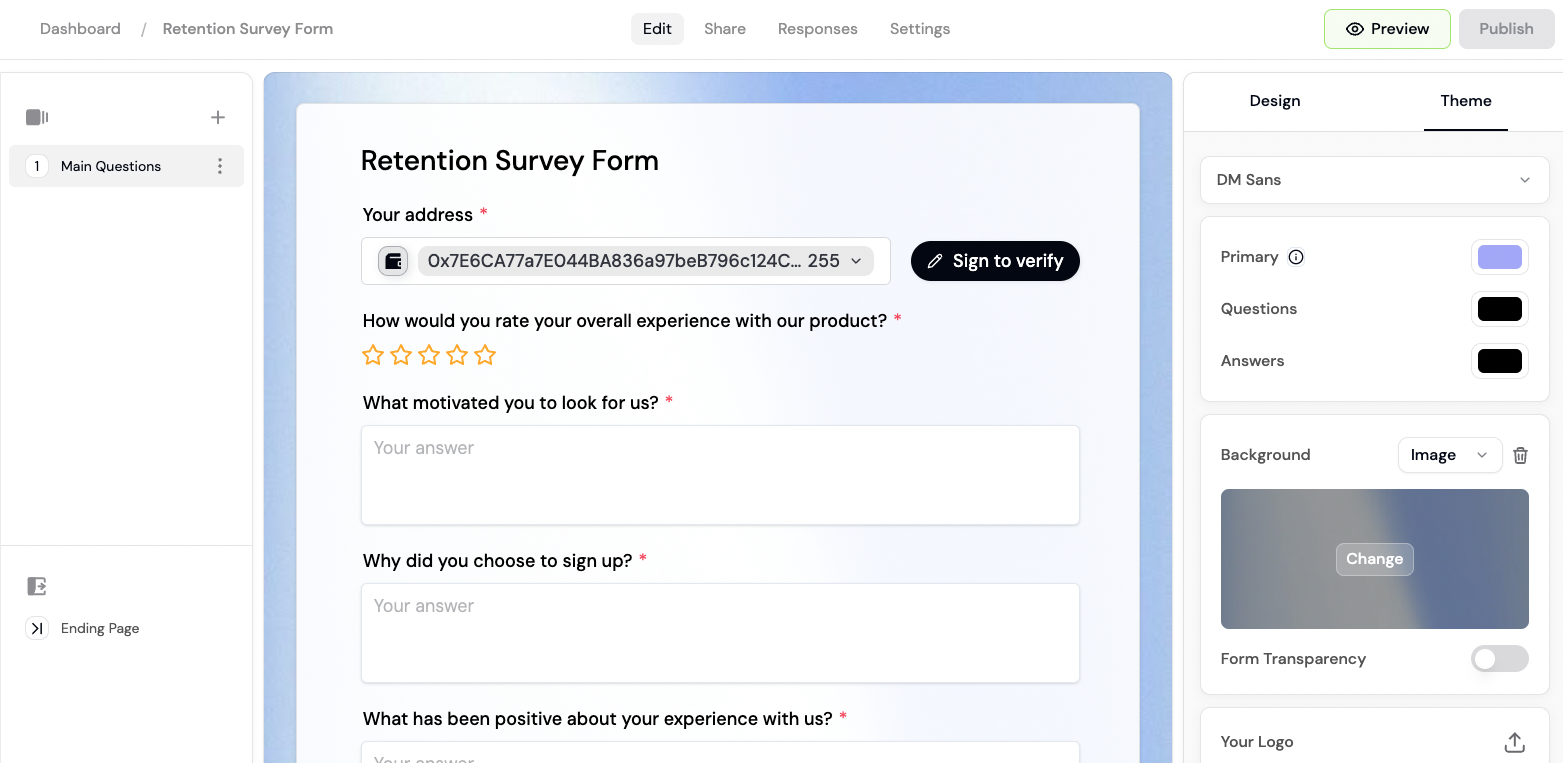 Launch token-gated forms, waitlists, and surveys for your community.
* 🔑 **Token gating.** Gate access by token ownership, NFT collections, or other onchain credentials.
* ✅ **Verified socials.** Verify Twitter accounts, Discord usernames, and more.
* 🎨 **Custom branding.** Customize your backgrounds, colors, and logo to match your brand.
* 🎨 **Template library.** Choose from a variety of form templates or build your own.
* 🌐 **World ID** proof-of-personhood verification.
Launch token-gated forms, waitlists, and surveys for your community.
* 🔑 **Token gating.** Gate access by token ownership, NFT collections, or other onchain credentials.
* ✅ **Verified socials.** Verify Twitter accounts, Discord usernames, and more.
* 🎨 **Custom branding.** Customize your backgrounds, colors, and logo to match your brand.
* 🎨 **Template library.** Choose from a variety of form templates or build your own.
* 🌐 **World ID** proof-of-personhood verification.
 ***
## How to create your first token-gated form
Build and launch a token-gated form in under 10 minutes. This guide walks you through creating a form, adding token requirements, customizing branding, and viewing responses.
### Step 1: Create a new form
1. Go to the [Formo Dashboard](https://app.formo.so)
2. Click **Forms** in the left navigation
3. Click **Create Form**
4. Choose a template or start from scratch:
* **Waitlist** - Collect emails and wallet addresses
* **Survey** - Gather feedback from your community
* **Application** - Accept applications for grants, allowlists, etc.
* **Blank** - Start with an empty form
Templates come with pre-built questions you can customize. Starting from a template saves time.
### Step 2: Add form fields
The form builder uses a drag-and-drop interface. Add fields by clicking the **+** button or dragging from the sidebar.
**Available field types:**
| Category | Fields |
| - | - |
| **Basic** | Short Text, Long Text, Email, Link, Heading, Paragraph, Image |
| **Advanced** | Single Choice, Dropdown, Checkboxes, File, Rating, Scale |
| **Verification** | Connect Wallet (EVM), Connect Wallet (Solana), Connect Discord, Connect X, Connect Telegram |
A Connect Wallet field is required if you want to gate the form by token or NFT ownership. Connect Discord, Connect X, and Connect Telegram fields verify and capture the respective account.
**Rating** shows a five-star widget. **Scale** shows a numeric scale with a configurable start, end, and step (0 to 10 by default), ideal for importance questions ("rate this from 1 to 5") and NPS-style surveys.
### Step 3: Enable token gating (optional)
To restrict form access based on token ownership:
1. Click **Settings** in the form builder toolbar
2. Toggle **Token Gating** to enable
3. Click **Add Requirement**
4. Configure your requirement:
* Select **ERC20 Token** (or **Native Token** for ETH, SOL, and other gas tokens)
* Choose the chain (Ethereum, Base, Arbitrum, etc.)
* Paste the token contract address (not needed for native tokens)
* Set the minimum amount
* Select **NFT** as the condition
* Choose the chain
* Paste the NFT contract address
* Set the minimum quantity
* Select **Contract Read** as the condition
* Choose the chain
* Paste the contract address and ABI
* Select a read function (e.g., `balanceOf`, `stakedAmount`)
* Set the comparison operator and expected value
* See [Contract Read guide](/features/token-gated-forms/token-gating#contract-read)
* Add **Connect World ID** as a requirement
* Users must verify with World ID before submitting
* See [World ID integration](/features/token-gated-forms/world-id)
Wallet requirements support both EVM chains and Solana (NFT, SPL Token, Native Token). You can also gate by Human Passport score, or require a verified (blue-check) X account, Discord, or Telegram connection. See [Token gating](/features/token-gated-forms/token-gating) for the full list of requirement types.
Add multiple requirements and choose whether responders must meet all of them or at least N of them.
### Step 4: Customize branding
Make your form match your brand:
1. Click **Design** in the form builder toolbar
2. Customize:
* **Logo** - Upload your project logo
* **Background** - Set a color or upload an image
* **Colors** - Match your brand colors
* **Font** - Choose from available fonts
### Step 5: Publish and share
1. Click **Publish** in the form builder toolbar
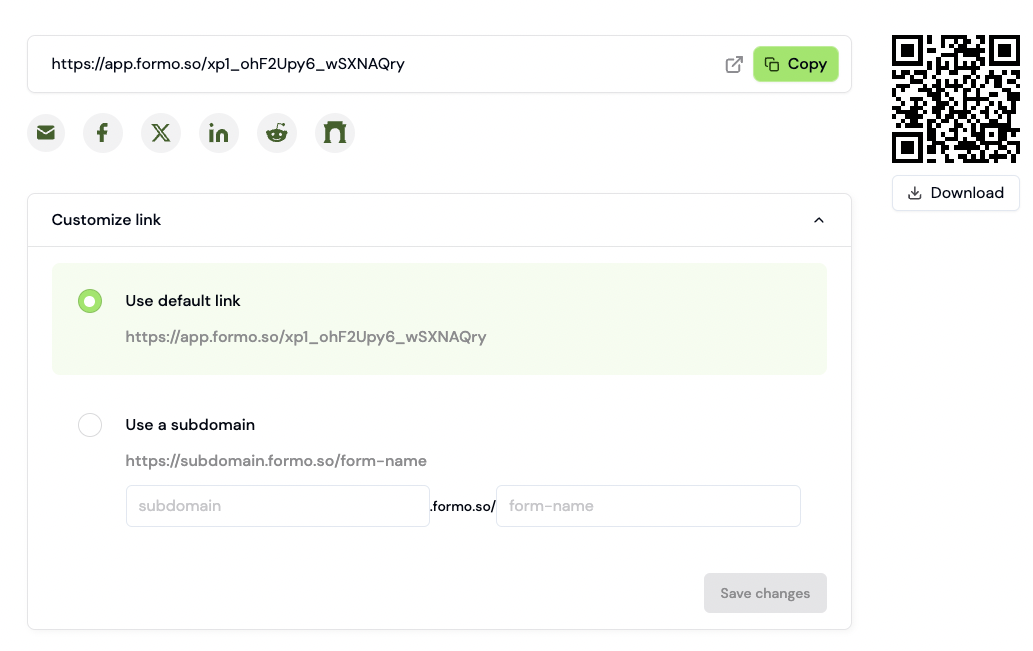
2. Copy your form URL (e.g., `app.formo.so/your-form-id`), download a QR code, or use the embed and social share options
3. Share the link with your community
### Step 6: View responses
As responses come in, view them in the dashboard:
1. Go to **Forms** > select your form
2. Click the **Responses** tab
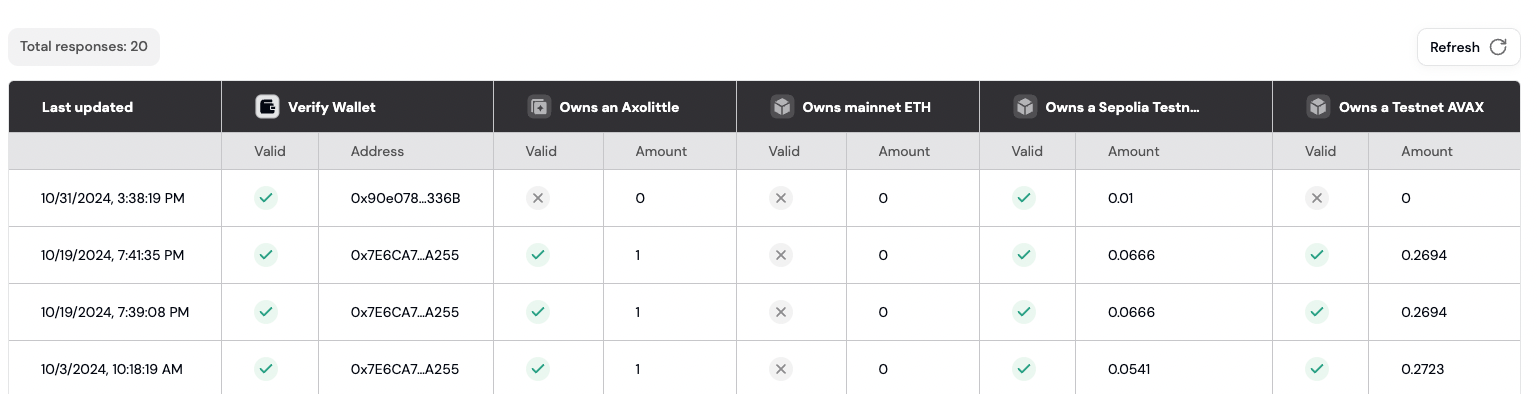
3. You'll see each submission with:
* Wallet address
* Form answers
* Token verification status
* Submission timestamp
### Example: NFT holder feedback form
Here's a practical example of a token-gated survey:
| Setting | Value |
| - | - |
| Template | Survey |
| Token requirement | NFT: Your collection address |
| Minimum holdings | 1 NFT |
| Questions | "How did you hear about us?", "What features would you like?" |
| Branding | Your logo, brand colors |
Only users holding at least 1 NFT from your collection can submit the form.
## FAQ
Token gating supports EVM-compatible chains (Ethereum, Base, Arbitrum, Optimism, Polygon, and more) as well as Solana. See the full list of [supported chains](/chains/overview).
Yes. You can configure multiple token gate conditions and choose whether responders must meet all of them or at least N of them. See [token gating](/features/token-gated-forms/token-gating#combining-requirements) for details.
You can require a connected Discord or Telegram account, or a verified (blue-check) X account. Combine these with World ID or Human Passport score to prevent sybil submissions. See [Token gating](/features/token-gated-forms/token-gating) for the full list of requirement types.
This documentation is built and hosted on [Mintlify](https://mintlify.com), a developer documentation platform.
***
## How to create your first token-gated form
Build and launch a token-gated form in under 10 minutes. This guide walks you through creating a form, adding token requirements, customizing branding, and viewing responses.
### Step 1: Create a new form
1. Go to the [Formo Dashboard](https://app.formo.so)
2. Click **Forms** in the left navigation
3. Click **Create Form**
4. Choose a template or start from scratch:
* **Waitlist** - Collect emails and wallet addresses
* **Survey** - Gather feedback from your community
* **Application** - Accept applications for grants, allowlists, etc.
* **Blank** - Start with an empty form
Templates come with pre-built questions you can customize. Starting from a template saves time.
### Step 2: Add form fields
The form builder uses a drag-and-drop interface. Add fields by clicking the **+** button or dragging from the sidebar.
**Available field types:**
| Category | Fields |
| - | - |
| **Basic** | Short Text, Long Text, Email, Link, Heading, Paragraph, Image |
| **Advanced** | Single Choice, Dropdown, Checkboxes, File, Rating, Scale |
| **Verification** | Connect Wallet (EVM), Connect Wallet (Solana), Connect Discord, Connect X, Connect Telegram |
A Connect Wallet field is required if you want to gate the form by token or NFT ownership. Connect Discord, Connect X, and Connect Telegram fields verify and capture the respective account.
**Rating** shows a five-star widget. **Scale** shows a numeric scale with a configurable start, end, and step (0 to 10 by default), ideal for importance questions ("rate this from 1 to 5") and NPS-style surveys.
### Step 3: Enable token gating (optional)
To restrict form access based on token ownership:
1. Click **Settings** in the form builder toolbar
2. Toggle **Token Gating** to enable
3. Click **Add Requirement**
4. Configure your requirement:
* Select **ERC20 Token** (or **Native Token** for ETH, SOL, and other gas tokens)
* Choose the chain (Ethereum, Base, Arbitrum, etc.)
* Paste the token contract address (not needed for native tokens)
* Set the minimum amount
* Select **NFT** as the condition
* Choose the chain
* Paste the NFT contract address
* Set the minimum quantity
* Select **Contract Read** as the condition
* Choose the chain
* Paste the contract address and ABI
* Select a read function (e.g., `balanceOf`, `stakedAmount`)
* Set the comparison operator and expected value
* See [Contract Read guide](/features/token-gated-forms/token-gating#contract-read)
* Add **Connect World ID** as a requirement
* Users must verify with World ID before submitting
* See [World ID integration](/features/token-gated-forms/world-id)
Wallet requirements support both EVM chains and Solana (NFT, SPL Token, Native Token). You can also gate by Human Passport score, or require a verified (blue-check) X account, Discord, or Telegram connection. See [Token gating](/features/token-gated-forms/token-gating) for the full list of requirement types.
Add multiple requirements and choose whether responders must meet all of them or at least N of them.
### Step 4: Customize branding
Make your form match your brand:
1. Click **Design** in the form builder toolbar
2. Customize:
* **Logo** - Upload your project logo
* **Background** - Set a color or upload an image
* **Colors** - Match your brand colors
* **Font** - Choose from available fonts
### Step 5: Publish and share
1. Click **Publish** in the form builder toolbar
2. Copy your form URL (e.g., `app.formo.so/your-form-id`), download a QR code, or use the embed and social share options
3. Share the link with your community
### Step 6: View responses
As responses come in, view them in the dashboard:
1. Go to **Forms** > select your form
2. Click the **Responses** tab
3. You'll see each submission with:
* Wallet address
* Form answers
* Token verification status
* Submission timestamp
### Example: NFT holder feedback form
Here's a practical example of a token-gated survey:
| Setting | Value |
| - | - |
| Template | Survey |
| Token requirement | NFT: Your collection address |
| Minimum holdings | 1 NFT |
| Questions | "How did you hear about us?", "What features would you like?" |
| Branding | Your logo, brand colors |
Only users holding at least 1 NFT from your collection can submit the form.
## FAQ
Token gating supports EVM-compatible chains (Ethereum, Base, Arbitrum, Optimism, Polygon, and more) as well as Solana. See the full list of [supported chains](/chains/overview).
Yes. You can configure multiple token gate conditions and choose whether responders must meet all of them or at least N of them. See [token gating](/features/token-gated-forms/token-gating#combining-requirements) for details.
You can require a connected Discord or Telegram account, or a verified (blue-check) X account. Combine these with World ID or Human Passport score to prevent sybil submissions. See [Token gating](/features/token-gated-forms/token-gating) for the full list of requirement types.
This documentation is built and hosted on [Mintlify](https://mintlify.com), a developer documentation platform.