> ## Documentation Index
> Fetch the complete documentation index at: https://docs.formo.so/llms.txt
> Use this file to discover all available pages before exploring further.
# Token gating
> Create token-gated forms using ERC-20 tokens, NFTs, SPL tokens, allowlists, or identity verification.
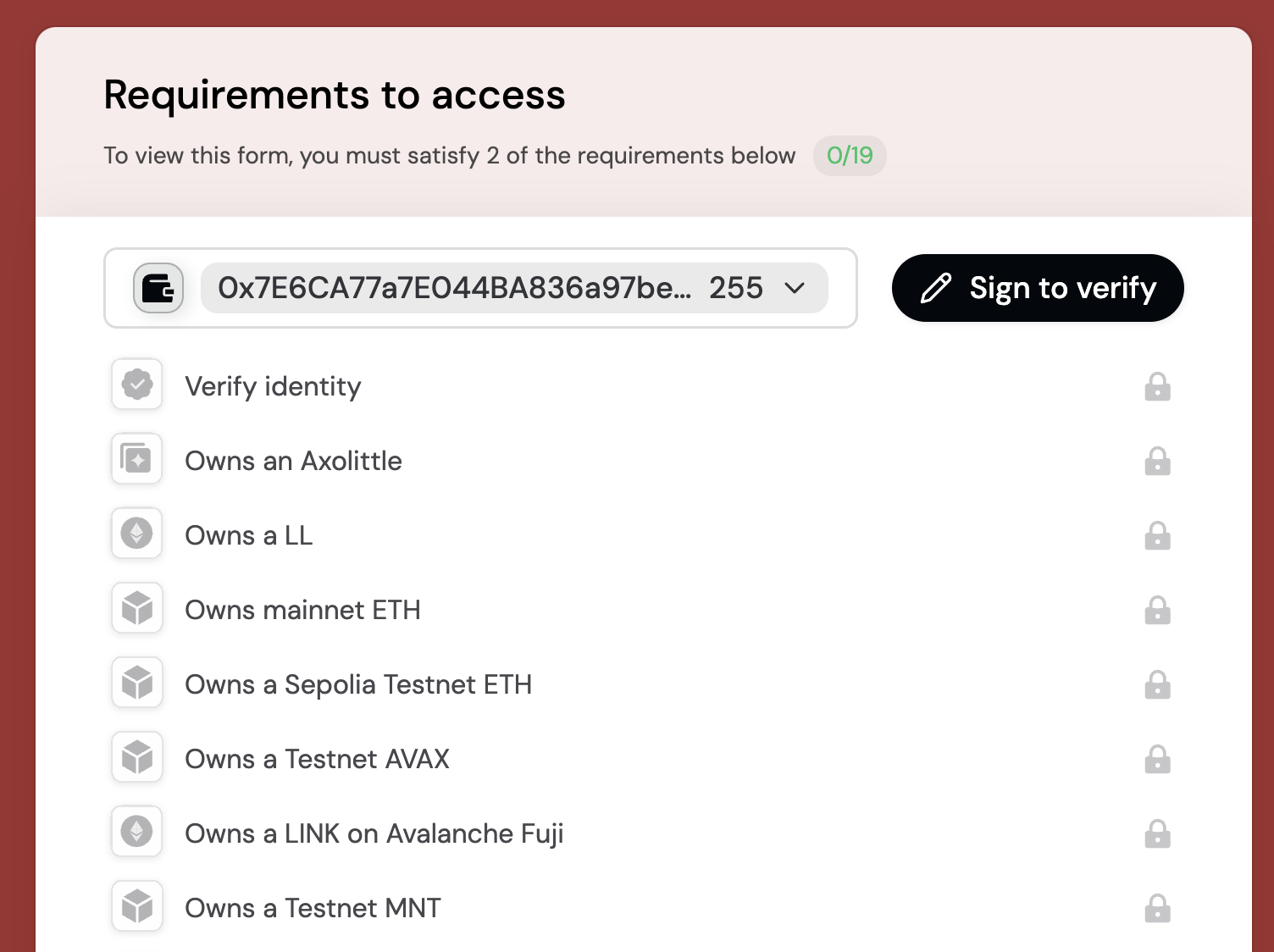 Formo supports token gating, giving you full control over who can access your forms.
## Quickstart
Formo supports token gating, giving you full control over who can access your forms.
## Quickstart
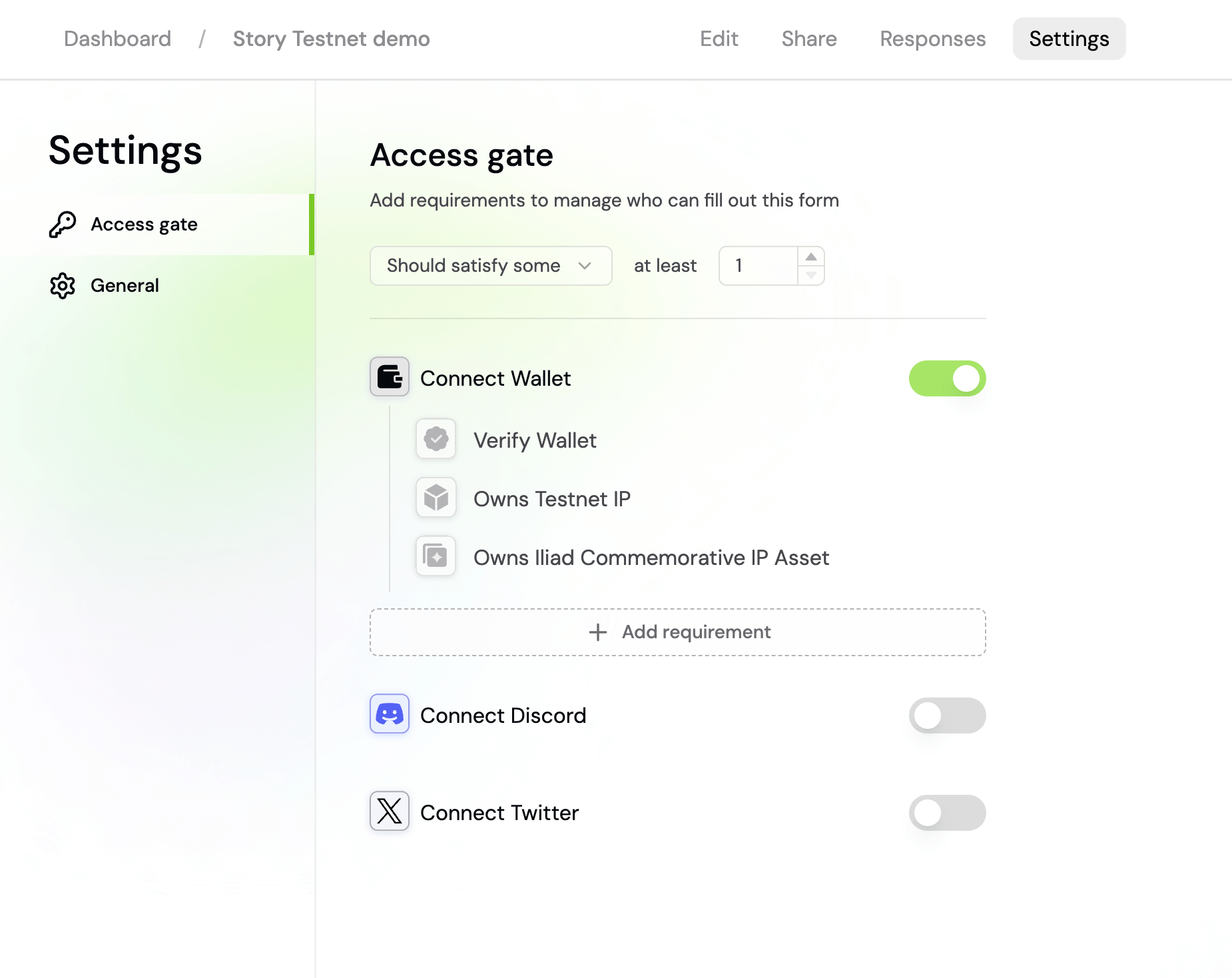 Sign in to [app.formo.so](https://app.formo.so) to create your form.
Go to your form's *settings* page to enable token gating.
Click *Add Requirement* to add one or more gating requirements.
Publish your form and share the link with your users.
Your form will verify that responders fulfill your requirements before continuing. Formo currently supports [35 chains](/chains/overview) for token gating.
Sign in to [app.formo.so](https://app.formo.so) to create your form.
Go to your form's *settings* page to enable token gating.
Click *Add Requirement* to add one or more gating requirements.
Publish your form and share the link with your users.
Your form will verify that responders fulfill your requirements before continuing. Formo currently supports [35 chains](/chains/overview) for token gating.
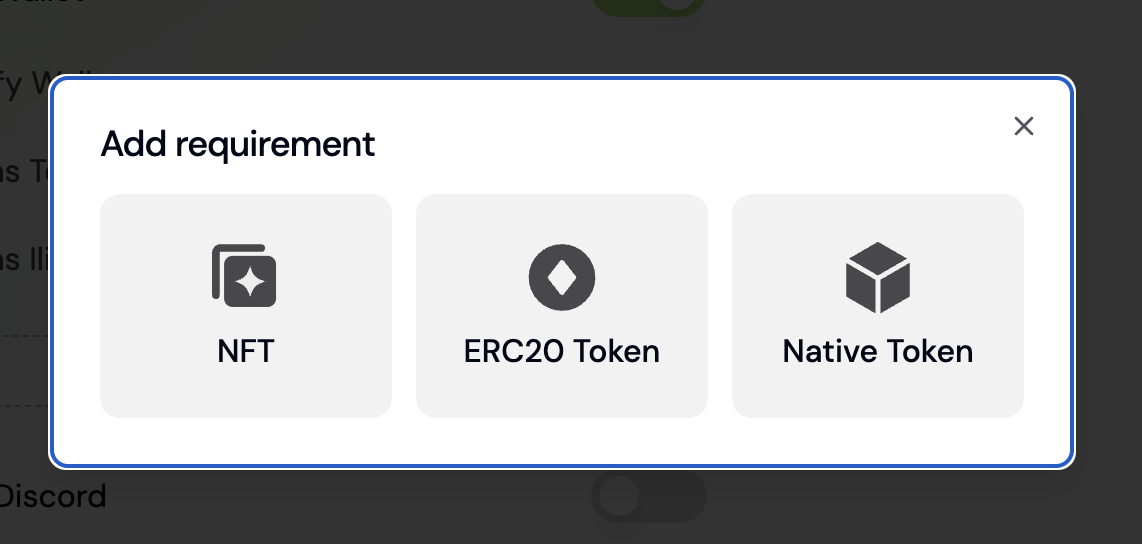 Choose from different types of token gating requirements:
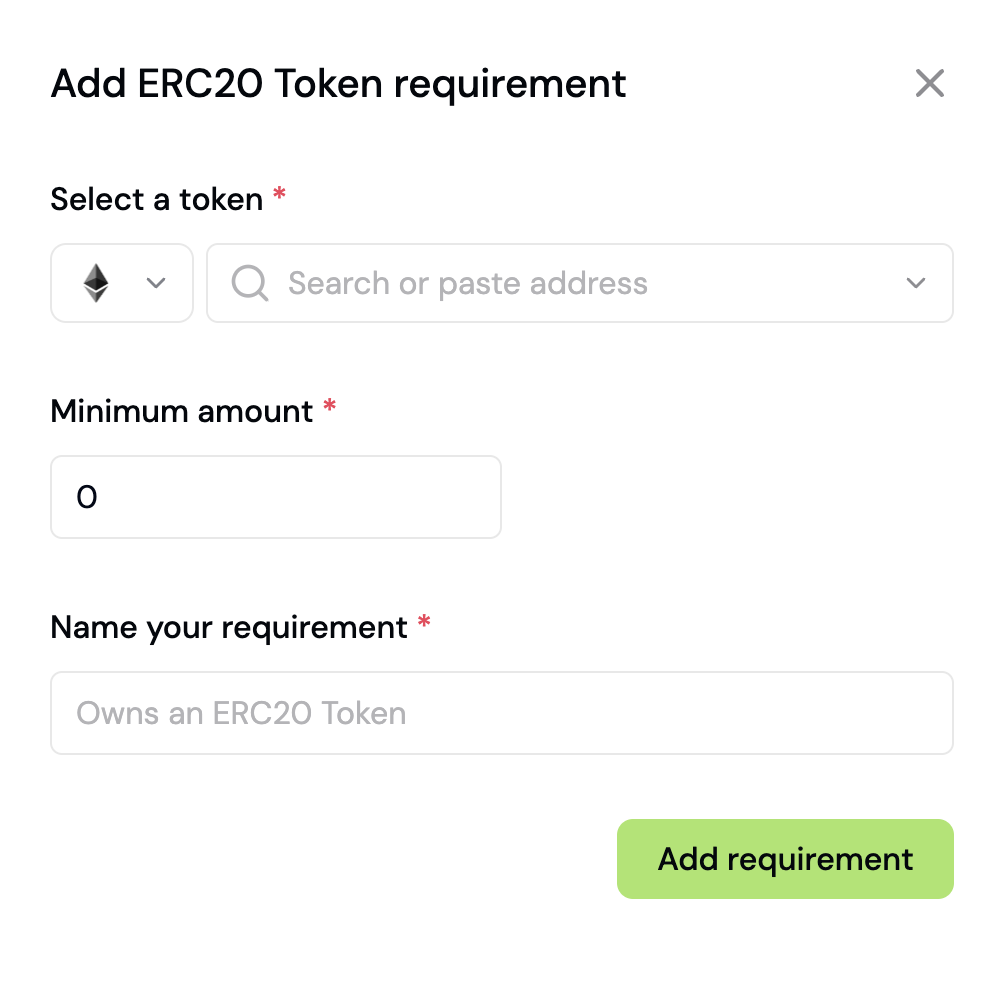 ## Native Token
Require responders to hold a minimum balance of a chain's native token (e.g., ETH, MATIC, BNB).
### Setup
1. In your form settings, click **Add Requirement** and select **Native Token**
2. Choose the **chain** (Ethereum, Base, Polygon, etc.)
3. Set the **minimum balance** required
### Example
Require at least 0.1 ETH on Ethereum Mainnet:
| Field | Value |
| - | - |
| Type | Native Token |
| Chain | Ethereum |
| Minimum balance | 0.1 |
## ERC-20 Token
Require responders to hold a minimum amount of a specific ERC-20 token.
### Setup
1. In your form settings, click **Add Requirement** and select **ERC-20**
2. Choose the **chain** where the token is deployed
3. Paste the **token contract address**
4. Set the **minimum balance** required
### Example
Require at least 1,000 USDC on Base:
| Field | Value |
| - | - |
| Type | ERC-20 |
| Chain | Base |
| Contract address | `0x833589fCD6eDb6E08f4c7C32D4f71b54bdA02913` |
| Minimum balance | 1000 |
Formo automatically detects the token name, symbol, and decimals from the contract address.
## NFT
Require responders to hold one or more NFTs from a specific collection (ERC-721 or ERC-1155).
### Setup
1. In your form settings, click **Add Requirement** and select **NFT**
2. Choose the **chain** where the NFT collection is deployed
3. Paste the **NFT contract address**
4. Set the **minimum quantity** required
### Example
Require at least 1 NFT from a collection on Ethereum:
| Field | Value |
| - | - |
| Type | NFT |
| Chain | Ethereum |
| Contract address | Your NFT collection address |
| Minimum quantity | 1 |
## Contract Read
Gate form access based on any smart contract's read function. This is useful for verifying staking balances, governance power, protocol participation, or any other onchain state that can be queried from a contract.
### How it works
Contract Read calls a read-only function on a smart contract and compares the result against a value you specify. The responder's wallet address can be passed as a function argument using the `{{address}}` placeholder.
**Example:** Require that the responder has staked at least 100 WCT tokens by reading the `stakedBalance(address)` function.
### Setup
In your form settings, click **Add Requirement** and select **Contract Read**.
Choose the chain where your contract is deployed (Ethereum, Base, Arbitrum, etc.)
Paste the smart contract address (e.g., `0x1234...abcd`).
Paste the contract ABI (JSON format). For verified contracts, you can copy the ABI from Etherscan.
Choose a read-only function from the ABI. Only `view` and `pure` functions are available.
Enter the function arguments. Use `{{address}}` as a placeholder for the responder's wallet address.
Choose a comparison operator and the expected value:
| Operator | Meaning |
| - | - |
| `>` | Greater than |
| `>=` | Greater than or equal |
| `<` | Less than |
| `<=` | Less than or equal |
| `==` | Equal to |
| `!=` | Not equal to |
Publish your form. Formo will verify each responder's wallet against the contract before allowing submission.
### Example: Staking requirement
Gate access to users who have staked at least 100 tokens:
| Field | Value |
| - | - |
| Chain | Ethereum |
| Contract address | Your staking contract |
| Function | `stakedBalance(address)` |
| Arguments | `{{address}}` |
| Operator | `>=` |
| Value | `100000000000000000000` (100 tokens with 18 decimals) |
Values are compared as raw integers. For ERC-20 tokens with 18 decimals, 100 tokens = `100000000000000000000` (100 \* 10^18).
### Example: Governance power
Require a minimum voting power to access a governance feedback form:
| Field | Value |
| - | - |
| Chain | Base |
| Contract address | Your governance token |
| Function | `getVotes(address)` |
| Arguments | `{{address}}` |
| Operator | `>=` |
| Value | `1000000000000000000000` (1000 tokens) |
### Supported functions
Contract Read supports any `view` or `pure` function that:
* Returns a single scalar value (number, boolean, address, or string)
* Takes scalar input parameters (no arrays or structs)
Common use cases include `balanceOf`, `stakedBalance`, `getVotes`, `isWhitelisted`, `hasRole`, and any custom getter function on your contract.
## Allowlist
Restrict a form to a fixed list of wallet addresses you upload as a CSV. Useful for private betas, airdrop claims, and any form where the audience is a list you already hold rather than an onchain condition.
Available on both **Connect Wallet (EVM)** and **Connect Wallet (Solana)**.
### How it works
Your browser turns the CSV into a **Bloom filter**, a compact bit array that answers "is this address on the list?". The original allowlist is never stored anywhere.
Respondents connect and sign with their wallet to prove they own the address. Formo verifies that proven address is in the allowlist.
### Setup
On your form, go to Settings > Access.
Turn on **Connect Wallet (EVM)** or **Connect Wallet (Solana)**.
For each Connect Wallet, click **Add requirement** and select **Allowlist (CSV)**.
Click **Upload CSV** and choose your file. Formo shows how many unique addresses it found.
Give the requirement a name (e.g. *Wallet is on the allowlist*) and save, then publish your form.
## Solana
Alongside EVM chains, you can gate forms on Solana wallets. Enable **Connect Wallet (Solana)** in your form settings, then add one or more conditions:
| Condition | Requires |
| - | - |
| **Native Token** | A minimum SOL balance |
| **SPL Token** | A minimum balance of an SPL token, by mint address |
| **NFT** | An NFT from a specific collection |
| **Allowlist (CSV)** | Membership of a list you upload (see [above](#allowlist)) |
Responders connect a Solana wallet (Phantom or Solflare) and sign a message to prove ownership before their balances are checked.
### Setup
1. In your form settings, enable **Connect Wallet (Solana)**
2. Click **Add requirement** and choose a condition
3. For SPL Token, paste the **token mint address** and set the **minimum balance**
4. For NFT, paste the **collection address** and set the **minimum quantity**
EVM and Solana requirements can be combined on one form. Pair them with **Should meet some** if responders may hold assets on either ecosystem.
## World ID
Require responders to verify with World ID's proof-of-personhood check before submitting. See [World ID integration](/features/token-gated-forms/world-id) for setup.
Optionally enable **Require unique World ID** to block the same verified human from submitting more than once.
## Human Passport
Require a minimum [Human Passport](https://docs.passport.xyz/) Unique Humanity Score to filter out bots and sybil accounts.
### Setup
1. In your form settings, click **Add Requirement** and select **Human Passport**
2. Set the **minimum Unique Humanity Score** (0-100; defaults to 20)
Only one Human Passport requirement is allowed per form.
### Example
| Field | Value |
| - | - |
| Type | Human Passport |
| Minimum score | 20 |
## X Verified
Require responders to have a verified X (formerly Twitter) account, indicated by the blue checkmark.
### Setup
In your form settings, click **Add Requirement**, select **Connect X**, then **X Verified**. No further configuration is required.
## Discord
Require responders to connect a Discord account before submitting.
### Setup
In your form settings, click **Add Requirement** and select **Connect Discord**. No further configuration is required.
## Telegram
Require responders to connect a Telegram account before submitting.
### Setup
In your form settings, click **Add Requirement** and select **Connect Telegram**. No further configuration is required.
## Combining requirements
Under **Access gating** in your form settings, choose how many requirements a responder must meet:
* **Should meet all** (default): responders must satisfy every requirement you've added
* **Should meet some**: responders must satisfy at least N of your requirements, where you set N
## Require unique wallet addresses
Under a **Connect Wallet** requirement, enable **Require unique wallet addresses** to block the same wallet from submitting more than once. Use it for airdrops, claims, and one-vote-per-wallet forms.
The equivalent toggle for World ID is **Require unique World ID**, which blocks the same verified human rather than the same wallet.
This documentation is built and hosted on [Mintlify](https://mintlify.com), a developer documentation platform.
## Native Token
Require responders to hold a minimum balance of a chain's native token (e.g., ETH, MATIC, BNB).
### Setup
1. In your form settings, click **Add Requirement** and select **Native Token**
2. Choose the **chain** (Ethereum, Base, Polygon, etc.)
3. Set the **minimum balance** required
### Example
Require at least 0.1 ETH on Ethereum Mainnet:
| Field | Value |
| - | - |
| Type | Native Token |
| Chain | Ethereum |
| Minimum balance | 0.1 |
## ERC-20 Token
Require responders to hold a minimum amount of a specific ERC-20 token.
### Setup
1. In your form settings, click **Add Requirement** and select **ERC-20**
2. Choose the **chain** where the token is deployed
3. Paste the **token contract address**
4. Set the **minimum balance** required
### Example
Require at least 1,000 USDC on Base:
| Field | Value |
| - | - |
| Type | ERC-20 |
| Chain | Base |
| Contract address | `0x833589fCD6eDb6E08f4c7C32D4f71b54bdA02913` |
| Minimum balance | 1000 |
Formo automatically detects the token name, symbol, and decimals from the contract address.
## NFT
Require responders to hold one or more NFTs from a specific collection (ERC-721 or ERC-1155).
### Setup
1. In your form settings, click **Add Requirement** and select **NFT**
2. Choose the **chain** where the NFT collection is deployed
3. Paste the **NFT contract address**
4. Set the **minimum quantity** required
### Example
Require at least 1 NFT from a collection on Ethereum:
| Field | Value |
| - | - |
| Type | NFT |
| Chain | Ethereum |
| Contract address | Your NFT collection address |
| Minimum quantity | 1 |
## Contract Read
Gate form access based on any smart contract's read function. This is useful for verifying staking balances, governance power, protocol participation, or any other onchain state that can be queried from a contract.
### How it works
Contract Read calls a read-only function on a smart contract and compares the result against a value you specify. The responder's wallet address can be passed as a function argument using the `{{address}}` placeholder.
**Example:** Require that the responder has staked at least 100 WCT tokens by reading the `stakedBalance(address)` function.
### Setup
In your form settings, click **Add Requirement** and select **Contract Read**.
Choose the chain where your contract is deployed (Ethereum, Base, Arbitrum, etc.)
Paste the smart contract address (e.g., `0x1234...abcd`).
Paste the contract ABI (JSON format). For verified contracts, you can copy the ABI from Etherscan.
Choose a read-only function from the ABI. Only `view` and `pure` functions are available.
Enter the function arguments. Use `{{address}}` as a placeholder for the responder's wallet address.
Choose a comparison operator and the expected value:
| Operator | Meaning |
| - | - |
| `>` | Greater than |
| `>=` | Greater than or equal |
| `<` | Less than |
| `<=` | Less than or equal |
| `==` | Equal to |
| `!=` | Not equal to |
Publish your form. Formo will verify each responder's wallet against the contract before allowing submission.
### Example: Staking requirement
Gate access to users who have staked at least 100 tokens:
| Field | Value |
| - | - |
| Chain | Ethereum |
| Contract address | Your staking contract |
| Function | `stakedBalance(address)` |
| Arguments | `{{address}}` |
| Operator | `>=` |
| Value | `100000000000000000000` (100 tokens with 18 decimals) |
Values are compared as raw integers. For ERC-20 tokens with 18 decimals, 100 tokens = `100000000000000000000` (100 \* 10^18).
### Example: Governance power
Require a minimum voting power to access a governance feedback form:
| Field | Value |
| - | - |
| Chain | Base |
| Contract address | Your governance token |
| Function | `getVotes(address)` |
| Arguments | `{{address}}` |
| Operator | `>=` |
| Value | `1000000000000000000000` (1000 tokens) |
### Supported functions
Contract Read supports any `view` or `pure` function that:
* Returns a single scalar value (number, boolean, address, or string)
* Takes scalar input parameters (no arrays or structs)
Common use cases include `balanceOf`, `stakedBalance`, `getVotes`, `isWhitelisted`, `hasRole`, and any custom getter function on your contract.
## Allowlist
Restrict a form to a fixed list of wallet addresses you upload as a CSV. Useful for private betas, airdrop claims, and any form where the audience is a list you already hold rather than an onchain condition.
Available on both **Connect Wallet (EVM)** and **Connect Wallet (Solana)**.
### How it works
Your browser turns the CSV into a **Bloom filter**, a compact bit array that answers "is this address on the list?". The original allowlist is never stored anywhere.
Respondents connect and sign with their wallet to prove they own the address. Formo verifies that proven address is in the allowlist.
### Setup
On your form, go to Settings > Access.
Turn on **Connect Wallet (EVM)** or **Connect Wallet (Solana)**.
For each Connect Wallet, click **Add requirement** and select **Allowlist (CSV)**.
Click **Upload CSV** and choose your file. Formo shows how many unique addresses it found.
Give the requirement a name (e.g. *Wallet is on the allowlist*) and save, then publish your form.
## Solana
Alongside EVM chains, you can gate forms on Solana wallets. Enable **Connect Wallet (Solana)** in your form settings, then add one or more conditions:
| Condition | Requires |
| - | - |
| **Native Token** | A minimum SOL balance |
| **SPL Token** | A minimum balance of an SPL token, by mint address |
| **NFT** | An NFT from a specific collection |
| **Allowlist (CSV)** | Membership of a list you upload (see [above](#allowlist)) |
Responders connect a Solana wallet (Phantom or Solflare) and sign a message to prove ownership before their balances are checked.
### Setup
1. In your form settings, enable **Connect Wallet (Solana)**
2. Click **Add requirement** and choose a condition
3. For SPL Token, paste the **token mint address** and set the **minimum balance**
4. For NFT, paste the **collection address** and set the **minimum quantity**
EVM and Solana requirements can be combined on one form. Pair them with **Should meet some** if responders may hold assets on either ecosystem.
## World ID
Require responders to verify with World ID's proof-of-personhood check before submitting. See [World ID integration](/features/token-gated-forms/world-id) for setup.
Optionally enable **Require unique World ID** to block the same verified human from submitting more than once.
## Human Passport
Require a minimum [Human Passport](https://docs.passport.xyz/) Unique Humanity Score to filter out bots and sybil accounts.
### Setup
1. In your form settings, click **Add Requirement** and select **Human Passport**
2. Set the **minimum Unique Humanity Score** (0-100; defaults to 20)
Only one Human Passport requirement is allowed per form.
### Example
| Field | Value |
| - | - |
| Type | Human Passport |
| Minimum score | 20 |
## X Verified
Require responders to have a verified X (formerly Twitter) account, indicated by the blue checkmark.
### Setup
In your form settings, click **Add Requirement**, select **Connect X**, then **X Verified**. No further configuration is required.
## Discord
Require responders to connect a Discord account before submitting.
### Setup
In your form settings, click **Add Requirement** and select **Connect Discord**. No further configuration is required.
## Telegram
Require responders to connect a Telegram account before submitting.
### Setup
In your form settings, click **Add Requirement** and select **Connect Telegram**. No further configuration is required.
## Combining requirements
Under **Access gating** in your form settings, choose how many requirements a responder must meet:
* **Should meet all** (default): responders must satisfy every requirement you've added
* **Should meet some**: responders must satisfy at least N of your requirements, where you set N
## Require unique wallet addresses
Under a **Connect Wallet** requirement, enable **Require unique wallet addresses** to block the same wallet from submitting more than once. Use it for airdrops, claims, and one-vote-per-wallet forms.
The equivalent toggle for World ID is **Require unique World ID**, which blocks the same verified human rather than the same wallet.
This documentation is built and hosted on [Mintlify](https://mintlify.com), a developer documentation platform.