> ## Documentation Index
> Fetch the complete documentation index at: https://docs.formo.so/llms.txt
> Use this file to discover all available pages before exploring further.
# Wallet intelligence overview
> Explore wallet intelligence features including wallet profiles, audience insights, user segmentation, labels, and scoring for onchain user targeting.
 ## Features
Wallet intelligence helps you **understand and target users with crypto-native segmentation based on unified offchain and onchain data**:
* 🔍 **Wallet search.** Look up any wallet address to generate a full profile on demand.
* 🕵️♀️ **Wallet profiles.** Turn wallet addresses into user profiles.
* 👥 **Audience insights.** See your users' lifecycle, apps, tokens, chains, revenue, and retention.
* 🤩 **User segments.** Target segments based on wallet properties and in-app activity.
* 🏷️ **Wallet labels.** Further enrich wallet profiles with wallet labels.
Profile data is available for querying and export in the [Profiles API](/api/overview#profiles-api).
***
## How to explore your users
This guide walks you through viewing wallet profiles, understanding your audience, and creating your first user segment.
### Step 1: View the Users page
1. Open the [Formo Dashboard](https://app.formo.so)
2. Select your project from the sidebar
3. Click **Users** in the left navigation
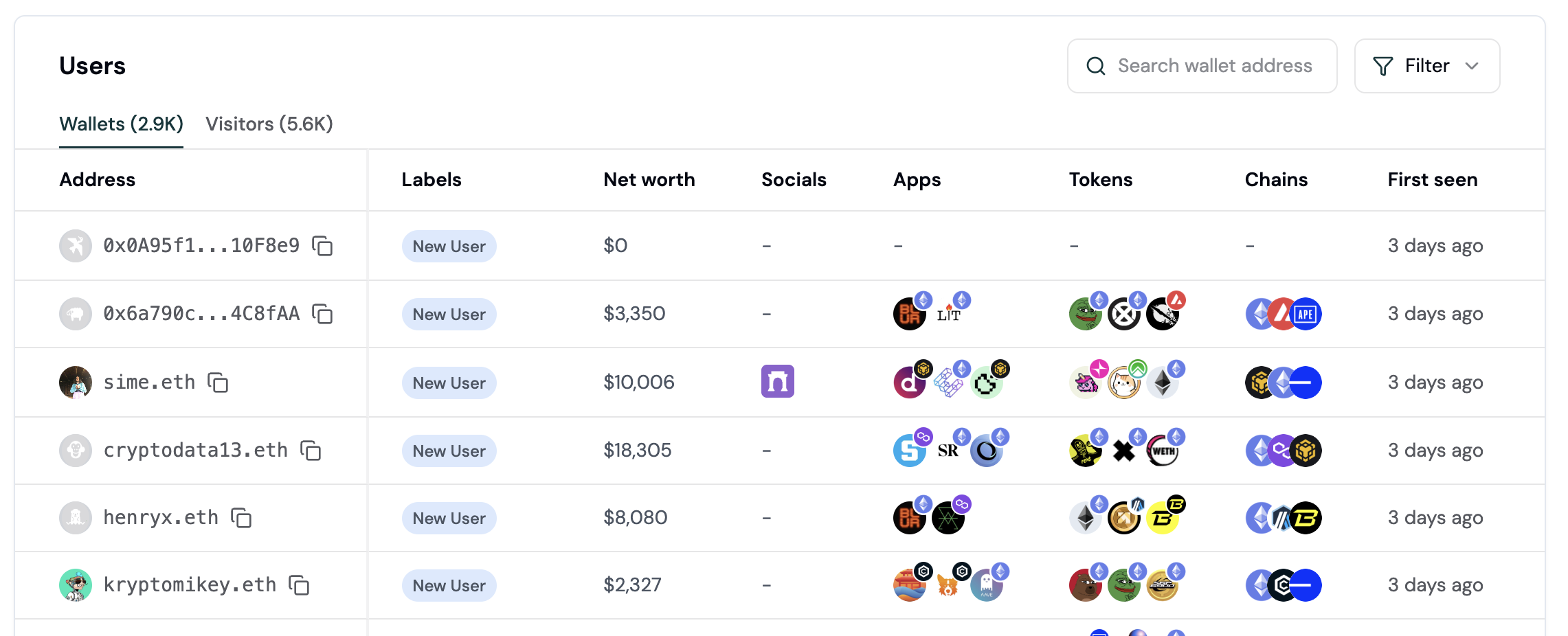
You'll see a table of all users who have connected a wallet to your app, along with key metrics like net worth, lifecycle stage, and last seen.
### Step 2: Explore a wallet profile
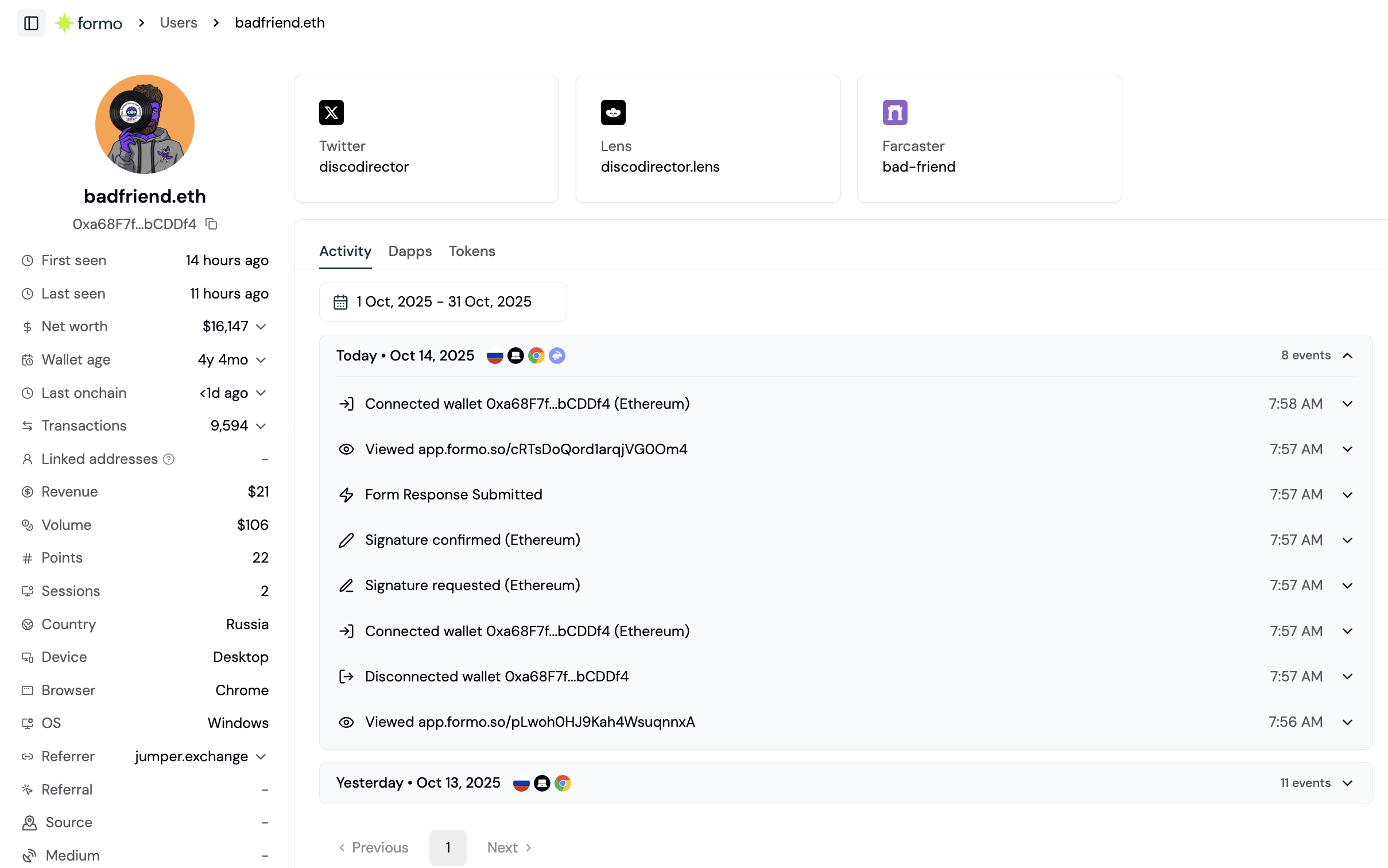
Click on any wallet address to open its full profile. The wallet profile shows:
| Section | What you'll see |
| - | - |
| **Activity** | Real-time feed of actions on your app with UTM attribution |
| **Apps** | DeFi applications the wallet uses across chains |
| **Tokens** | Token balances and holdings across chains |
| **Properties** | Custom properties and labels. |
## Features
Wallet intelligence helps you **understand and target users with crypto-native segmentation based on unified offchain and onchain data**:
* 🔍 **Wallet search.** Look up any wallet address to generate a full profile on demand.
* 🕵️♀️ **Wallet profiles.** Turn wallet addresses into user profiles.
* 👥 **Audience insights.** See your users' lifecycle, apps, tokens, chains, revenue, and retention.
* 🤩 **User segments.** Target segments based on wallet properties and in-app activity.
* 🏷️ **Wallet labels.** Further enrich wallet profiles with wallet labels.
Profile data is available for querying and export in the [Profiles API](/api/overview#profiles-api).
***
## How to explore your users
This guide walks you through viewing wallet profiles, understanding your audience, and creating your first user segment.
### Step 1: View the Users page
1. Open the [Formo Dashboard](https://app.formo.so)
2. Select your project from the sidebar
3. Click **Users** in the left navigation
You'll see a table of all users who have connected a wallet to your app, along with key metrics like net worth, lifecycle stage, and last seen.
### Step 2: Explore a wallet profile
Click on any wallet address to open its full profile. The wallet profile shows:
| Section | What you'll see |
| - | - |
| **Activity** | Real-time feed of actions on your app with UTM attribution |
| **Apps** | DeFi applications the wallet uses across chains |
| **Tokens** | Token balances and holdings across chains |
| **Properties** | Custom properties and labels. |
 ### Step 3: Understand lifecycle stages
Formo automatically categorizes users by lifecycle stage based on their activity:
| Stage | What it means |
| - | - |
| **New** | Recent acquisition |
| **Returning** | Engaged user |
| **Power user** | Highly engaged |
| **At Risk** | Still active but going quiet |
| **Churned** | Needs re-engagement |
| **Resurrected** | Re-engaged after going quiet |
Use the lifecycle filter on the Users page to focus on specific user groups.
See [User Lifecycle](/features/wallet-intelligence/wallet-profiles#user-lifecycle) for the exact rules and thresholds behind each stage.
### Step 4: Create your first segment
Segments let you group users by shared characteristics. Here's how to create one:
1. Go to **Users** in the sidebar
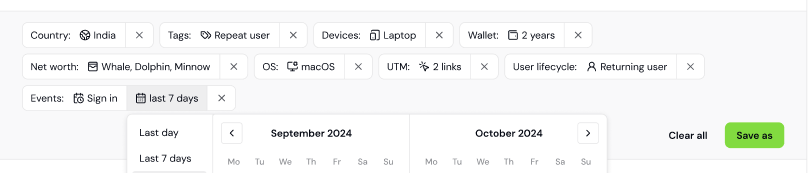
2. Apply filter conditions. For example:
* Lifecycle = "Power user"
* Net worth > \$10,000
* Label = "Coinbase Verified"
3. Click **Save Segment**
4. Name your segment (e.g., "High-Value Verified Users")
5. Click **Save**
Saved segments are managed inline on the Users page via the Segments dropdown.
### Step 3: Understand lifecycle stages
Formo automatically categorizes users by lifecycle stage based on their activity:
| Stage | What it means |
| - | - |
| **New** | Recent acquisition |
| **Returning** | Engaged user |
| **Power user** | Highly engaged |
| **At Risk** | Still active but going quiet |
| **Churned** | Needs re-engagement |
| **Resurrected** | Re-engaged after going quiet |
Use the lifecycle filter on the Users page to focus on specific user groups.
See [User Lifecycle](/features/wallet-intelligence/wallet-profiles#user-lifecycle) for the exact rules and thresholds behind each stage.
### Step 4: Create your first segment
Segments let you group users by shared characteristics. Here's how to create one:
1. Go to **Users** in the sidebar
2. Apply filter conditions. For example:
* Lifecycle = "Power user"
* Net worth > \$10,000
* Label = "Coinbase Verified"
3. Click **Save Segment**
4. Name your segment (e.g., "High-Value Verified Users")
5. Click **Save**
Saved segments are managed inline on the Users page via the Segments dropdown.
 ### Example: Find whales who churned
Here's a practical segment to identify high-value users at risk:
| Filter | Value |
| - | - |
| Lifecycle | Churned |
| Net worth | > \$100,000 |
| Last seen | > 30 days ago |
Export this segment as CSV to run targeted re-engagement campaigns on social channels.
## FAQ
Formo aggregates onchain data across major EVM chains and Solana to build wallet profiles. This includes token holdings, DeFi positions, wallet age, transaction frequency, and net worth. Data is refreshed periodically to keep profiles current.
Lifecycle stages are calculated from a wallet's activity recency and frequency on your app, relative to a reference date that defaults to today. Default thresholds can be customized in Settings → Lifecycle. See [User Lifecycle](/features/wallet-intelligence/wallet-profiles#user-lifecycle) for the exact rules.
Yes. You can export any [segment](/features/wallet-intelligence/segments) as a CSV file for use in targeted re-engagement campaigns. You can also query profiles programmatically via the [Profiles API](/api/profiles/get).
Yes. Formo automatically groups wallets that share a session or a common user ID into clusters. Each wallet's profile lists its **Linked Addresses**, and the **Clusters** tab on the Users page shows every multi-wallet group with its member wallets. You can also use [formo.identify()](/data/events/identify) to associate wallets with a common user ID.
This documentation is built and hosted on [Mintlify](https://mintlify.com), a developer documentation platform.
### Example: Find whales who churned
Here's a practical segment to identify high-value users at risk:
| Filter | Value |
| - | - |
| Lifecycle | Churned |
| Net worth | > \$100,000 |
| Last seen | > 30 days ago |
Export this segment as CSV to run targeted re-engagement campaigns on social channels.
## FAQ
Formo aggregates onchain data across major EVM chains and Solana to build wallet profiles. This includes token holdings, DeFi positions, wallet age, transaction frequency, and net worth. Data is refreshed periodically to keep profiles current.
Lifecycle stages are calculated from a wallet's activity recency and frequency on your app, relative to a reference date that defaults to today. Default thresholds can be customized in Settings → Lifecycle. See [User Lifecycle](/features/wallet-intelligence/wallet-profiles#user-lifecycle) for the exact rules.
Yes. You can export any [segment](/features/wallet-intelligence/segments) as a CSV file for use in targeted re-engagement campaigns. You can also query profiles programmatically via the [Profiles API](/api/profiles/get).
Yes. Formo automatically groups wallets that share a session or a common user ID into clusters. Each wallet's profile lists its **Linked Addresses**, and the **Clusters** tab on the Users page shows every multi-wallet group with its member wallets. You can also use [formo.identify()](/data/events/identify) to associate wallets with a common user ID.
This documentation is built and hosted on [Mintlify](https://mintlify.com), a developer documentation platform.