> ## Documentation Index
> Fetch the complete documentation index at: https://docs.formo.so/llms.txt
> Use this file to discover all available pages before exploring further.
# Wallet labels
> Understand user interests and behavior with automatically generated wallet labels based on onchain activity, reputation, and user properties.
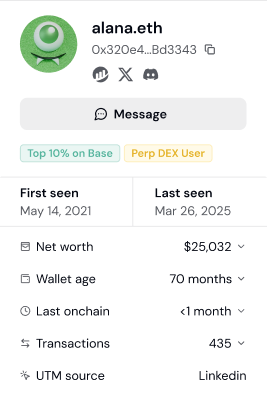 **Wallet Labels** annotate blockchain addresses with attributes like verification status, lifecycle stage, and reputation scores.
Use labels to build [segments](/features/wallet-intelligence/segments) that target users matching your Ideal Customer Profile (ICP).
## List of Labels
Each tracked user on Formo is assigned labels based on their onchain activity and other data.
### User lifecycle labels
Every wallet is assigned a lifecycle stage based on its recency and active days: **New**, **Returning**, **Power user**, **At Risk**, **Churned**, or **Resurrected**. See [User lifecycle](/features/wallet-intelligence/wallet-profiles#user-lifecycle) for the exact rules and thresholds.
### Attestations
| Label | Description |
| - | - |
| **OFAC Sanctioned** | OFAC-sanction status, sourced from Chainalysis's onchain sanctions oracle |
| **Human Passport Unique Humanity Score** | [Human Passport score (0-100)](https://docs.passport.xyz/) |
| **Human Passport Aggregate Model Score** | [Aggregate unique humanity score for EVM wallets (0-100, or -1 if there's insufficient transaction history)](https://docs.passport.xyz/building-with-passport/models/available-models#aggregate-unique-humanity-model) |
| **Coinbase Verified Account** | [Coinbase verified account attestations](https://www.coinbase.com/developer-platform/products/verifications) |
| **Coinbase Verified Country** | Coinbase verified country attestations with country code extraction |
| **Coinbase One** | Coinbase One subscription attestations |
| **Binance Verified** | Holds a [Binance Account Bound Token (BABT)](https://www.binance.com/en/babt), attesting the wallet completed Binance KYC |
### Sybil
Wallets that appear on published airdrop sybil / farmer lists. These are one-time historical snapshots from past airdrop investigations, so a wallet is labeled only if it was named in the original list.
| Label | Description |
| - | - |
| **Sybil (LayerZero)** | Named in the [LayerZero airdrop sybil list](https://github.com/psrvere/layerzero-sybil-checker) as a suspected airdrop farmer |
| **Sybil (Hop)** | Listed as a sybil attacker in the [Hop Protocol airdrop](https://github.com/hop-protocol/hop-airdrop/blob/master/src/data/eliminatedSybilAttackers.csv) |
| **Sybil (Optimism)** | Removed from the [Optimism airdrop](https://community.optimism.io/citizens-house/airdrops/airdrop-1) for sybil activity |
### Behavioural labels
Behavioural labels computed from a wallet's current onchain positions. Formo groups every protocol a wallet holds a position in into a category (lending, DEX, perps, staking, and so on) and applies one rule per label. Each label carries a value: the USD amount behind the label, which you can filter with `>`, `>=`, `<` and `<=`, or for the bridge and aggregator labels the names of the protocols the wallet used, which you can filter by protocol.
Rules that apply to every label below:
* Only positions from the wallet's latest profile snapshot count. A position the wallet has closed never lingers.
* Labels refresh daily and are removed automatically when the rule stops holding.
* An active wallet is re-profiled every 30 days.
| Label | Rule | Value |
| - | - | - |
| **DeFi Lender** | Supplies at least \$100 to lending markets such as Aave, Compound, Morpho or Spark. Collateral locked in a CDP does not count. | Supplied USD |
| **DeFi Borrower** | Owes at least \$100 across lending markets and CDPs such as Aave, Maker, Sky or Liquity. | Borrowed USD |
| **Liquidity Provider** | Holds at least \$100 in DEX liquidity positions on Uniswap, Curve, Aerodrome, PancakeSwap and similar. | Position USD |
| **Yield Farmer** | Holds at least \$100 in vaults or yield aggregators such as Pendle, Beefy, Yearn or Morpho vault curators. | Deposit USD |
| **Staker** | Holds at least $100 in liquid staking, restaking or native chain staking (Lido, ether.fi, EigenLayer), or at least $100 of liquid staking tokens such as stETH, wstETH, rETH or weETH in the wallet. | Staked USD |
| **Perp Trader** | Holds at least \$100 of open margin or liquidity in a perpetuals venue such as Hyperliquid or GMX. Closed trades leave no position and are not counted. | Position USD |
| **Options Trader** | Holds at least \$100 in an onchain options venue. | Position USD |
| **Basis Trader** | Holds at least \$100 in a delta-neutral dollar product such as Ethena. | Deposit USD |
| **RWA Holder** | Holds at least \$100 in tokenised real-world assets: tokenised gold (PAXG, XAUt), treasury and cash notes (USDY, OUSG, BUIDL, Midas), tokenised stocks (xStocks, Backed), private credit pools (Maple, Goldfinch, Centrifuge), carbon or real estate. | Position USD |
| **Bridge User** | Has used a bridge or bridge aggregator such as Stargate, Across, Hop, LI.FI or Relay, detected from transaction history or a bridge liquidity position. | Bridges used, for example "Stargate, Across" |
| **Aggregator User** | Has swapped through a swap aggregator such as KyberSwap, 1inch, Paraswap, CoW, detected from transaction history. | Aggregators used, for example "KyberSwap, 1inch" |
### Others
| Label | Description |
| - | - |
| **Merkl Campaigns** | Tracks rewards earned in [Merkl](https://merkl.xyz) incentive programs. Merkl calls a program an *opportunity*, and each reward period of it a *campaign*. For each program, Formo stores the opportunity ID, the program name and protocol, each campaign the wallet earned from, and the reward value in USD: rewards claimed, rewards claimable, and rewards pending Merkl's next update, at the token price when the wallet was profiled. Programs and campaigns stay on the wallet after Merkl stops listing them. Filter users by an opportunity ID or a campaign ID, or leave the ID blank to find users in any Merkl program. |
| **ERC-8004 AI Agent** | Automatically detects wallets registered as AI agents via the [ERC-8004](https://erc8004.org) standard. Formo queries onchain registries across 11 chains to identify agent wallets (agent discovery runs via subgraph on 5 of them; the rest are used for RPC and reputation lookups once an agent is found) and surfaces the agent name, ID, and reputation score on the wallet profile. |
***
## How to use labels for targeting
This section covers using labels to identify and target specific user types.
### How labels work
Formo automatically analyzes each wallet's onchain activity and assigns relevant labels. Labels update as users' behavior changes. You can also add your own custom labels to a wallet for information Formo can't detect on its own.
**Label sources:**
* **Lifecycle** - Engagement stage derived from each wallet's recency and active days
* **Attestations** - Verified credentials from Coinbase, Binance, Human Passport, and OFAC sanction lists
* **Behavioural labels** - What the wallet currently does onchain: lending, borrowing, liquidity provision, staking, perps, options, basis trading, real-world assets, bridges and aggregators
* **Sybil lists** - Membership in published airdrop sybil / farmer lists (LayerZero, Hop, Optimism)
* **Campaigns** - Participation in incentive campaigns such as Merkl
* **Onchain registries** - Standards such as ERC-8004 that identify AI agent wallets
* **Custom** - Labels you add manually to a wallet's profile
### Step 1: View labels on a user profile
1. Go to **Users** and click any wallet address
2. Open the **Properties** tab
3. See all labels assigned to this user in the **User Labels** section
Auto-generated labels (lifecycle, attestations, campaigns, registries) are read-only. Click **+ Add Label** to add, edit, or remove a custom label. To filter users by label, use **Add Filter** (see Step 2 below).
### Step 2: Filter users by label
Use labels to find specific user types:
1. Go to **Users**
2. Click **Add Filter**
3. Select **Label** as the filter type
4. Choose the label(s) you want
**Example filters:**
| Goal | Label Filter |
| - | - |
| Find power users | Lifecycle = "Power user" |
| Find verified humans | Human Passport Score > 50 |
| Exclude sanctioned wallets | Label != "OFAC Sanctioned" |
| Find Coinbase users | Label = "Coinbase Verified Account" |
| Find active lenders | DeFi Lender >= 10,000 |
| Find leveraged users | DeFi Borrower >= 1,000 |
| Find gold and treasury holders | RWA Holder >= 500 |
### Step 3: Combine labels with other filters
Combine labels with other filters to narrow further:
**High-value DeFi users:**
| Filter | Value |
| - | - |
| Apps | Uniswap, Aave (or other DeFi protocols) |
| Net Worth | > \$50,000 |
| Lifecycle | Power user |
**Verified users from campaigns:**
| Filter | Value |
| - | - |
| Label | Coinbase Verified Account |
| UTM Source | twitter |
| First Seen | Last 30 days |
**At-risk whales:**
| Filter | Value |
| - | - |
| Net Worth | > \$100,000 |
| Lifecycle | At Risk |
### Step 4: Save as a segment
Turn useful label combinations into reusable segments:
1. Apply your label + other filters
2. Click **Save Segment**
3. Name it descriptively (e.g., "Verified DeFi Whales")
4. Use the segment for analysis, exports, or alerts
### Common targeting strategies
**Identify your ICP (Ideal Customer Profile):**
1. Look at your best users (highest volume, most active)
2. Check which labels they share
3. Create a segment with those labels
4. Use it to find similar users
**Compliance filtering:**
1. Filter by Label != "OFAC Sanctioned"
2. Add Human Passport Score > 20 for sybil resistance
3. Export clean lists for marketing or rewards
**Quality scoring:**
1. Combine multiple positive labels (Power user + Coinbase Verified Account + Human Passport Score > 50)
2. Users matching more labels = higher quality
3. Prioritize multi-label users for outreach
**Competitive targeting:**
1. Use Apps filter to find users of competitor protocols
2. Combine with labels showing high engagement
3. Target these users with differentiated messaging
### Label-based alerting
Set up alerts based on labels:
1. Go to **Settings** > **Alerts**
2. Create a **User** alert
3. Add filters: Lifecycle = "Power user" AND net\_worth\_usd > 100000, or Labels = your target label
4. Get notified within 5 minutes when a wallet matching those filters becomes active
This documentation is built and hosted on [Mintlify](https://mintlify.com), a developer documentation platform.
**Wallet Labels** annotate blockchain addresses with attributes like verification status, lifecycle stage, and reputation scores.
Use labels to build [segments](/features/wallet-intelligence/segments) that target users matching your Ideal Customer Profile (ICP).
## List of Labels
Each tracked user on Formo is assigned labels based on their onchain activity and other data.
### User lifecycle labels
Every wallet is assigned a lifecycle stage based on its recency and active days: **New**, **Returning**, **Power user**, **At Risk**, **Churned**, or **Resurrected**. See [User lifecycle](/features/wallet-intelligence/wallet-profiles#user-lifecycle) for the exact rules and thresholds.
### Attestations
| Label | Description |
| - | - |
| **OFAC Sanctioned** | OFAC-sanction status, sourced from Chainalysis's onchain sanctions oracle |
| **Human Passport Unique Humanity Score** | [Human Passport score (0-100)](https://docs.passport.xyz/) |
| **Human Passport Aggregate Model Score** | [Aggregate unique humanity score for EVM wallets (0-100, or -1 if there's insufficient transaction history)](https://docs.passport.xyz/building-with-passport/models/available-models#aggregate-unique-humanity-model) |
| **Coinbase Verified Account** | [Coinbase verified account attestations](https://www.coinbase.com/developer-platform/products/verifications) |
| **Coinbase Verified Country** | Coinbase verified country attestations with country code extraction |
| **Coinbase One** | Coinbase One subscription attestations |
| **Binance Verified** | Holds a [Binance Account Bound Token (BABT)](https://www.binance.com/en/babt), attesting the wallet completed Binance KYC |
### Sybil
Wallets that appear on published airdrop sybil / farmer lists. These are one-time historical snapshots from past airdrop investigations, so a wallet is labeled only if it was named in the original list.
| Label | Description |
| - | - |
| **Sybil (LayerZero)** | Named in the [LayerZero airdrop sybil list](https://github.com/psrvere/layerzero-sybil-checker) as a suspected airdrop farmer |
| **Sybil (Hop)** | Listed as a sybil attacker in the [Hop Protocol airdrop](https://github.com/hop-protocol/hop-airdrop/blob/master/src/data/eliminatedSybilAttackers.csv) |
| **Sybil (Optimism)** | Removed from the [Optimism airdrop](https://community.optimism.io/citizens-house/airdrops/airdrop-1) for sybil activity |
### Behavioural labels
Behavioural labels computed from a wallet's current onchain positions. Formo groups every protocol a wallet holds a position in into a category (lending, DEX, perps, staking, and so on) and applies one rule per label. Each label carries a value: the USD amount behind the label, which you can filter with `>`, `>=`, `<` and `<=`, or for the bridge and aggregator labels the names of the protocols the wallet used, which you can filter by protocol.
Rules that apply to every label below:
* Only positions from the wallet's latest profile snapshot count. A position the wallet has closed never lingers.
* Labels refresh daily and are removed automatically when the rule stops holding.
* An active wallet is re-profiled every 30 days.
| Label | Rule | Value |
| - | - | - |
| **DeFi Lender** | Supplies at least \$100 to lending markets such as Aave, Compound, Morpho or Spark. Collateral locked in a CDP does not count. | Supplied USD |
| **DeFi Borrower** | Owes at least \$100 across lending markets and CDPs such as Aave, Maker, Sky or Liquity. | Borrowed USD |
| **Liquidity Provider** | Holds at least \$100 in DEX liquidity positions on Uniswap, Curve, Aerodrome, PancakeSwap and similar. | Position USD |
| **Yield Farmer** | Holds at least \$100 in vaults or yield aggregators such as Pendle, Beefy, Yearn or Morpho vault curators. | Deposit USD |
| **Staker** | Holds at least $100 in liquid staking, restaking or native chain staking (Lido, ether.fi, EigenLayer), or at least $100 of liquid staking tokens such as stETH, wstETH, rETH or weETH in the wallet. | Staked USD |
| **Perp Trader** | Holds at least \$100 of open margin or liquidity in a perpetuals venue such as Hyperliquid or GMX. Closed trades leave no position and are not counted. | Position USD |
| **Options Trader** | Holds at least \$100 in an onchain options venue. | Position USD |
| **Basis Trader** | Holds at least \$100 in a delta-neutral dollar product such as Ethena. | Deposit USD |
| **RWA Holder** | Holds at least \$100 in tokenised real-world assets: tokenised gold (PAXG, XAUt), treasury and cash notes (USDY, OUSG, BUIDL, Midas), tokenised stocks (xStocks, Backed), private credit pools (Maple, Goldfinch, Centrifuge), carbon or real estate. | Position USD |
| **Bridge User** | Has used a bridge or bridge aggregator such as Stargate, Across, Hop, LI.FI or Relay, detected from transaction history or a bridge liquidity position. | Bridges used, for example "Stargate, Across" |
| **Aggregator User** | Has swapped through a swap aggregator such as KyberSwap, 1inch, Paraswap, CoW, detected from transaction history. | Aggregators used, for example "KyberSwap, 1inch" |
### Others
| Label | Description |
| - | - |
| **Merkl Campaigns** | Tracks rewards earned in [Merkl](https://merkl.xyz) incentive programs. Merkl calls a program an *opportunity*, and each reward period of it a *campaign*. For each program, Formo stores the opportunity ID, the program name and protocol, each campaign the wallet earned from, and the reward value in USD: rewards claimed, rewards claimable, and rewards pending Merkl's next update, at the token price when the wallet was profiled. Programs and campaigns stay on the wallet after Merkl stops listing them. Filter users by an opportunity ID or a campaign ID, or leave the ID blank to find users in any Merkl program. |
| **ERC-8004 AI Agent** | Automatically detects wallets registered as AI agents via the [ERC-8004](https://erc8004.org) standard. Formo queries onchain registries across 11 chains to identify agent wallets (agent discovery runs via subgraph on 5 of them; the rest are used for RPC and reputation lookups once an agent is found) and surfaces the agent name, ID, and reputation score on the wallet profile. |
***
## How to use labels for targeting
This section covers using labels to identify and target specific user types.
### How labels work
Formo automatically analyzes each wallet's onchain activity and assigns relevant labels. Labels update as users' behavior changes. You can also add your own custom labels to a wallet for information Formo can't detect on its own.
**Label sources:**
* **Lifecycle** - Engagement stage derived from each wallet's recency and active days
* **Attestations** - Verified credentials from Coinbase, Binance, Human Passport, and OFAC sanction lists
* **Behavioural labels** - What the wallet currently does onchain: lending, borrowing, liquidity provision, staking, perps, options, basis trading, real-world assets, bridges and aggregators
* **Sybil lists** - Membership in published airdrop sybil / farmer lists (LayerZero, Hop, Optimism)
* **Campaigns** - Participation in incentive campaigns such as Merkl
* **Onchain registries** - Standards such as ERC-8004 that identify AI agent wallets
* **Custom** - Labels you add manually to a wallet's profile
### Step 1: View labels on a user profile
1. Go to **Users** and click any wallet address
2. Open the **Properties** tab
3. See all labels assigned to this user in the **User Labels** section
Auto-generated labels (lifecycle, attestations, campaigns, registries) are read-only. Click **+ Add Label** to add, edit, or remove a custom label. To filter users by label, use **Add Filter** (see Step 2 below).
### Step 2: Filter users by label
Use labels to find specific user types:
1. Go to **Users**
2. Click **Add Filter**
3. Select **Label** as the filter type
4. Choose the label(s) you want
**Example filters:**
| Goal | Label Filter |
| - | - |
| Find power users | Lifecycle = "Power user" |
| Find verified humans | Human Passport Score > 50 |
| Exclude sanctioned wallets | Label != "OFAC Sanctioned" |
| Find Coinbase users | Label = "Coinbase Verified Account" |
| Find active lenders | DeFi Lender >= 10,000 |
| Find leveraged users | DeFi Borrower >= 1,000 |
| Find gold and treasury holders | RWA Holder >= 500 |
### Step 3: Combine labels with other filters
Combine labels with other filters to narrow further:
**High-value DeFi users:**
| Filter | Value |
| - | - |
| Apps | Uniswap, Aave (or other DeFi protocols) |
| Net Worth | > \$50,000 |
| Lifecycle | Power user |
**Verified users from campaigns:**
| Filter | Value |
| - | - |
| Label | Coinbase Verified Account |
| UTM Source | twitter |
| First Seen | Last 30 days |
**At-risk whales:**
| Filter | Value |
| - | - |
| Net Worth | > \$100,000 |
| Lifecycle | At Risk |
### Step 4: Save as a segment
Turn useful label combinations into reusable segments:
1. Apply your label + other filters
2. Click **Save Segment**
3. Name it descriptively (e.g., "Verified DeFi Whales")
4. Use the segment for analysis, exports, or alerts
### Common targeting strategies
**Identify your ICP (Ideal Customer Profile):**
1. Look at your best users (highest volume, most active)
2. Check which labels they share
3. Create a segment with those labels
4. Use it to find similar users
**Compliance filtering:**
1. Filter by Label != "OFAC Sanctioned"
2. Add Human Passport Score > 20 for sybil resistance
3. Export clean lists for marketing or rewards
**Quality scoring:**
1. Combine multiple positive labels (Power user + Coinbase Verified Account + Human Passport Score > 50)
2. Users matching more labels = higher quality
3. Prioritize multi-label users for outreach
**Competitive targeting:**
1. Use Apps filter to find users of competitor protocols
2. Combine with labels showing high engagement
3. Target these users with differentiated messaging
### Label-based alerting
Set up alerts based on labels:
1. Go to **Settings** > **Alerts**
2. Create a **User** alert
3. Add filters: Lifecycle = "Power user" AND net\_worth\_usd > 100000, or Labels = your target label
4. Get notified within 5 minutes when a wallet matching those filters becomes active
This documentation is built and hosted on [Mintlify](https://mintlify.com), a developer documentation platform.