> ## Documentation Index
> Fetch the complete documentation index at: https://docs.formo.so/llms.txt
> Use this file to discover all available pages before exploring further.
# How to Track Smart Contract Events in Real Time
> Monitor smart contract activity by adding contract addresses, tracking events like swaps and transfers, and using onchain data in funnels and dashboards.
Frontend analytics only capture what happens on your site. A user might visit your app 10 times without transacting, or transact without ever visiting your site. Contract events track onchain activity directly, independent of frontend visits.
With Formo, you can monitor contract activity in real time, link it to your users, and use it in funnels, flows, and dashboards.
## Part 1: Navigate to Project Settings > Contracts
In the Formo dashboard:
* Go to your project settings
* Select **Contracts**.
* You'll see a list of contracts you're already tracking and an **Add Contract** button.
 ## Part 2: Add a Contract
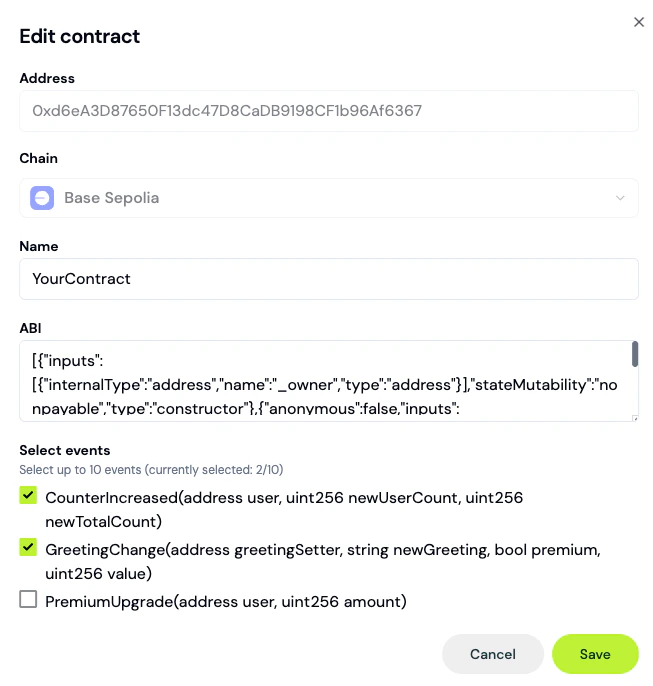
Click **Add Contract**. A modal opens.
1. Paste your **contract address** (e.g., `0x6B175474E89094C44Da98b954EedeAC495271d0F` for DAI on Ethereum)
2. Select the **chain** from the dropdown (Ethereum, Polygon, Arbitrum, Optimism, Base, etc.)
Once both fields lose focus, Formo automatically fetches the contract's ABI in the background. If successful, you'll see a list of all events in the contract.
If auto-detection fails, you can paste the ABI manually (copy from Etherscan, Hardhat build output, or your IDE).
> For proxy contracts, paste the implementation ABI, not the proxy ABI.
## Part 3: Select Events to Track
The ABI reveals all events defined in the contract. Formo shows checkboxes for each.
Common events to track:
* **Swap**: When a user executes a trade (typically includes `amount_in`, `amount_out`, `user`)
* **Transfer**: When tokens move (includes `from`, `to`, `value`)
* **Approval**: When user approves a spender
* **Deposit / Withdraw**: For lending/staking protocols
* **Mint / Burn**: For token creation/destruction
Check the events you want to track. You don't need to track every event, only the ones relevant to your analytics.
Example: For a DEX, track Swap. For a token, track Transfer and Approval.
## Part 4: Deploy the Pipeline
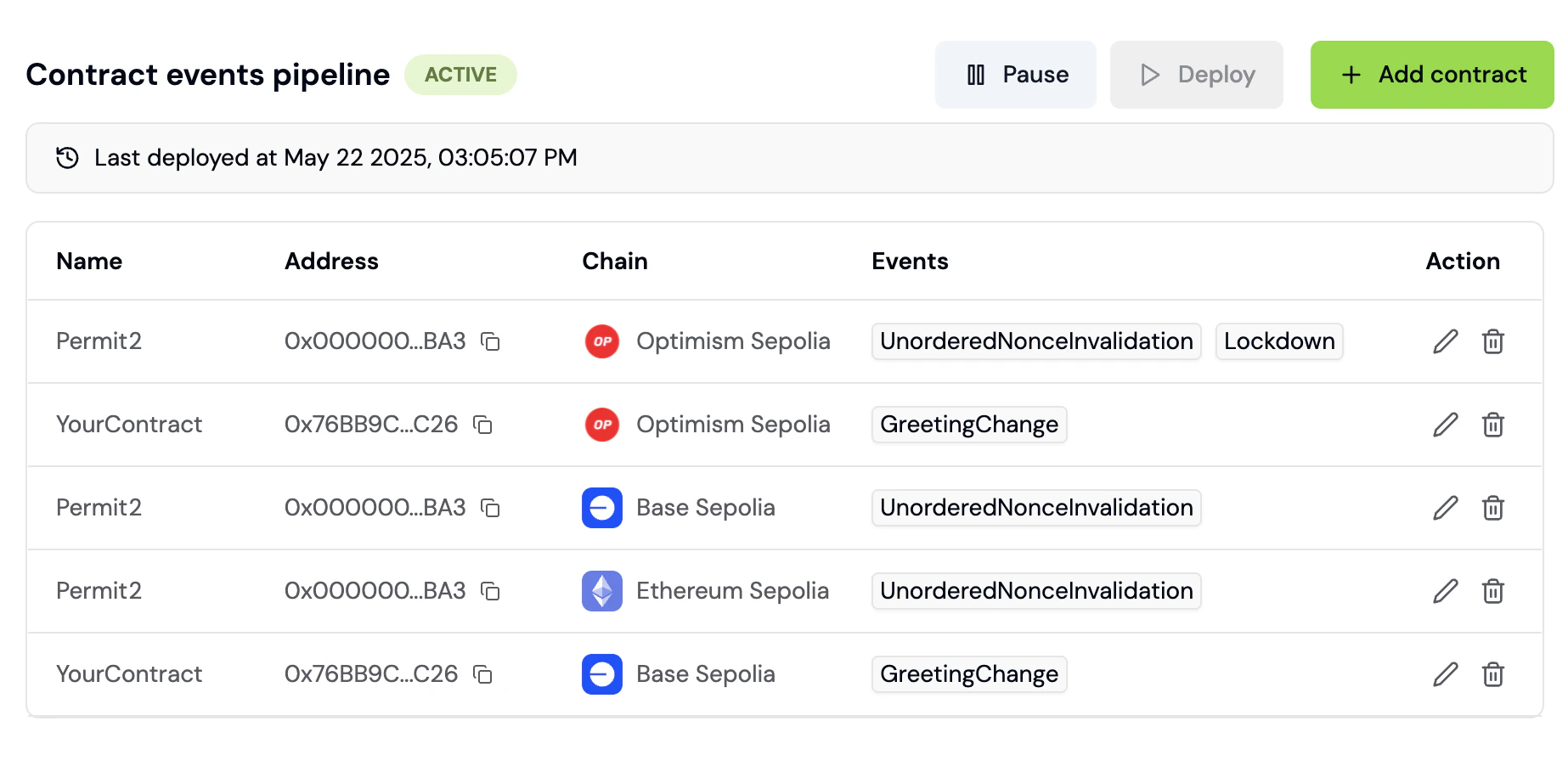
Once events are selected, click **Deploy**. Formo provisions the pipeline in the background.
Pipeline states progress as: **Draft** > **Active** (shown as **Live** in the UI). A pipeline can also land in **Inactive**, **Paused**, or **Error** if something needs your attention.
This typically takes a few minutes. Monitor the status in the Project Settings > Contracts panel.
Once **Live**, your smart contract events will start flowing into your Formo project.
You can add more contracts later. Just add it, select events, and deploy to update the pipeline.
## Part 5: See Contract Events in Activity Feed
Navigate to **Activity** in the sidebar. You'll see a unified feed of offchain events (web page views, mobile events) and onchain events (smart contract events e.g. swaps, transfers).
Scroll through to verify events are being captured. Filter for events by name like "Swap" or "Transfer" and properties like amount, token address, and timestamp.
Each contract event is automatically linked to a wallet address and session, so you can associate it with the user who executed the transaction.
## Part 6: Use Contract Events as Funnel Steps
Now that contract events are flowing, use them as steps in funnels and other charts.
Click **Dashboards** > **Add Chart** > **Funnel**.
In the funnel builder, you'll see a list of all of your events including events from the frontend (page views, wallet connects) and contract events (swaps, transfers) in the step dropdown.
Example funnel:
1. "Wallet Connected" (frontend event with type `connect`)
2. "Transaction" (frontend event with type `transaction`)
3. "Swap" (contract event: Swap)
This funnel measures: Of users who connected a wallet, how many made a transaction, and of those, how many executed a swap?
## Part 2: Add a Contract
Click **Add Contract**. A modal opens.
1. Paste your **contract address** (e.g., `0x6B175474E89094C44Da98b954EedeAC495271d0F` for DAI on Ethereum)
2. Select the **chain** from the dropdown (Ethereum, Polygon, Arbitrum, Optimism, Base, etc.)
Once both fields lose focus, Formo automatically fetches the contract's ABI in the background. If successful, you'll see a list of all events in the contract.
If auto-detection fails, you can paste the ABI manually (copy from Etherscan, Hardhat build output, or your IDE).
> For proxy contracts, paste the implementation ABI, not the proxy ABI.
## Part 3: Select Events to Track
The ABI reveals all events defined in the contract. Formo shows checkboxes for each.
Common events to track:
* **Swap**: When a user executes a trade (typically includes `amount_in`, `amount_out`, `user`)
* **Transfer**: When tokens move (includes `from`, `to`, `value`)
* **Approval**: When user approves a spender
* **Deposit / Withdraw**: For lending/staking protocols
* **Mint / Burn**: For token creation/destruction
Check the events you want to track. You don't need to track every event, only the ones relevant to your analytics.
Example: For a DEX, track Swap. For a token, track Transfer and Approval.
## Part 4: Deploy the Pipeline
Once events are selected, click **Deploy**. Formo provisions the pipeline in the background.
Pipeline states progress as: **Draft** > **Active** (shown as **Live** in the UI). A pipeline can also land in **Inactive**, **Paused**, or **Error** if something needs your attention.
This typically takes a few minutes. Monitor the status in the Project Settings > Contracts panel.
Once **Live**, your smart contract events will start flowing into your Formo project.
You can add more contracts later. Just add it, select events, and deploy to update the pipeline.
## Part 5: See Contract Events in Activity Feed
Navigate to **Activity** in the sidebar. You'll see a unified feed of offchain events (web page views, mobile events) and onchain events (smart contract events e.g. swaps, transfers).
Scroll through to verify events are being captured. Filter for events by name like "Swap" or "Transfer" and properties like amount, token address, and timestamp.
Each contract event is automatically linked to a wallet address and session, so you can associate it with the user who executed the transaction.
## Part 6: Use Contract Events as Funnel Steps
Now that contract events are flowing, use them as steps in funnels and other charts.
Click **Dashboards** > **Add Chart** > **Funnel**.
In the funnel builder, you'll see a list of all of your events including events from the frontend (page views, wallet connects) and contract events (swaps, transfers) in the step dropdown.
Example funnel:
1. "Wallet Connected" (frontend event with type `connect`)
2. "Transaction" (frontend event with type `transaction`)
3. "Swap" (contract event: Swap)
This funnel measures: Of users who connected a wallet, how many made a transaction, and of those, how many executed a swap?
 ## Part 7: Query Contract Events with SQL
For advanced analysis, use the **Explorer** (SQL editor).
Navigate to **Explorer** in the sidebar. The schema browser on the left shows available tables: `events`, `users`, `anonymous_users`.
The `events` table includes contract events with columns like:
* `type`: Event type (e.g., `decoded_log` for contract events, `connect` for wallet connections)
* `event`: Specific event name like "Swap", "Transfer", etc. (populated for `decoded_log` and `track` events)
* `address`: User's wallet address
* `timestamp`: When the event occurred
* `properties`: Event-specific data stored as JSON string (includes contract address, amounts, tokens, etc.)
### Essential Contract Event Queries
**Query 1: Daily Swap Volume**
```sql theme={null}
SELECT
toDate(timestamp) as date,
sum(JSONExtractFloat(properties, 'amount_out')) as total_volume
FROM events
WHERE type = 'decoded_log' AND event = 'Swap' AND JSONExtractString(properties, 'contract_address') = '0x...'
GROUP BY date
ORDER BY date DESC
```
**Query 2: Top Swappers (By Transaction Count)**
```sql theme={null}
SELECT
address,
count(*) as swap_count,
sum(JSONExtractFloat(properties, 'amount_out')) as total_volume
FROM events
WHERE type = 'decoded_log' AND event = 'Swap'
GROUP BY address
ORDER BY swap_count DESC
LIMIT 10
```
**Query 3: Time to First Swap (After Wallet Connect)**
```sql theme={null}
SELECT
avg(dateDiff('minute',
first_connect_time,
first_swap_time)) as avg_minutes_to_swap
FROM (
SELECT
address,
min(if(type = 'connect', timestamp, null)) as first_connect_time,
min(if(type = 'decoded_log' AND event = 'Swap', timestamp, null)) as first_swap_time
FROM events
GROUP BY address
)
WHERE first_swap_time IS NOT NULL
```
## Part 8: Build Dashboard Charts from Contract Events
In **Dashboards**, create charts filtered to contract events.
Example charts:
* **Line Chart**: Daily swap volume over time
* **Bar Chart**: Top 5 tokens swapped
* **Pie Chart**: Swap size distribution (small, medium, large)
* **Number Card**: Total transactions, unique swappers, total volume
Contract events are queryable the same way as frontend events, so you can build charts that mix both.
## Part 9: Set Up Alerts for Contract Events
Navigate to **Project Settings** > **Alerts**.
Create alerts for important contract events:
* "Alert me when a high-net-worth wallet connects"
* "Alert me when a whale executes a swap"
* "Alert me when a specific contract event fires"
## Pipeline Management
### Check Pipeline Status
In Project Settings > Contracts, each contract shows its pipeline state:
* **Draft**: Not yet deployed
* **Live**: Active and ingesting events
* **Inactive**: Deployed but not currently ingesting events
* **Paused**: Temporarily disabled
* **Error**: Pipeline failed (check logs)
### Pause a Pipeline
If you need to stop tracking a contract, click **Pause** next to its name. Events stop being ingested. You can resume anytime.
### Redeploy After Changes
If you add new events or update your contract, deploy again to update the pipeline.
## FAQ
Formo supports Ethereum, Polygon, Arbitrum, Optimism, Base, BNB Chain, Avalanche, Linea, Scroll, zkSync, and more. Full list at [Supported Chains](/chains/overview).
Formo uses a single unified Etherscan API (selecting the chain via a chainId parameter) to fetch verified ABIs, with Sourcify as a fallback if the contract isn't verified there. If your contract is verified on either source, the ABI is detected instantly. If not, paste the ABI manually.
Yes. For example, swap on Contract A, then bridge to Contract B. Both appear as funnel steps. Formo links them by wallet address and timestamp.
Yes. Each contract event counts as 1 event in your plan. For high-volume contracts (millions of events daily), consider filtering or segmenting.
This documentation is built and hosted on [Mintlify](https://mintlify.com), a developer documentation platform.
## Part 7: Query Contract Events with SQL
For advanced analysis, use the **Explorer** (SQL editor).
Navigate to **Explorer** in the sidebar. The schema browser on the left shows available tables: `events`, `users`, `anonymous_users`.
The `events` table includes contract events with columns like:
* `type`: Event type (e.g., `decoded_log` for contract events, `connect` for wallet connections)
* `event`: Specific event name like "Swap", "Transfer", etc. (populated for `decoded_log` and `track` events)
* `address`: User's wallet address
* `timestamp`: When the event occurred
* `properties`: Event-specific data stored as JSON string (includes contract address, amounts, tokens, etc.)
### Essential Contract Event Queries
**Query 1: Daily Swap Volume**
```sql theme={null}
SELECT
toDate(timestamp) as date,
sum(JSONExtractFloat(properties, 'amount_out')) as total_volume
FROM events
WHERE type = 'decoded_log' AND event = 'Swap' AND JSONExtractString(properties, 'contract_address') = '0x...'
GROUP BY date
ORDER BY date DESC
```
**Query 2: Top Swappers (By Transaction Count)**
```sql theme={null}
SELECT
address,
count(*) as swap_count,
sum(JSONExtractFloat(properties, 'amount_out')) as total_volume
FROM events
WHERE type = 'decoded_log' AND event = 'Swap'
GROUP BY address
ORDER BY swap_count DESC
LIMIT 10
```
**Query 3: Time to First Swap (After Wallet Connect)**
```sql theme={null}
SELECT
avg(dateDiff('minute',
first_connect_time,
first_swap_time)) as avg_minutes_to_swap
FROM (
SELECT
address,
min(if(type = 'connect', timestamp, null)) as first_connect_time,
min(if(type = 'decoded_log' AND event = 'Swap', timestamp, null)) as first_swap_time
FROM events
GROUP BY address
)
WHERE first_swap_time IS NOT NULL
```
## Part 8: Build Dashboard Charts from Contract Events
In **Dashboards**, create charts filtered to contract events.
Example charts:
* **Line Chart**: Daily swap volume over time
* **Bar Chart**: Top 5 tokens swapped
* **Pie Chart**: Swap size distribution (small, medium, large)
* **Number Card**: Total transactions, unique swappers, total volume
Contract events are queryable the same way as frontend events, so you can build charts that mix both.
## Part 9: Set Up Alerts for Contract Events
Navigate to **Project Settings** > **Alerts**.
Create alerts for important contract events:
* "Alert me when a high-net-worth wallet connects"
* "Alert me when a whale executes a swap"
* "Alert me when a specific contract event fires"
## Pipeline Management
### Check Pipeline Status
In Project Settings > Contracts, each contract shows its pipeline state:
* **Draft**: Not yet deployed
* **Live**: Active and ingesting events
* **Inactive**: Deployed but not currently ingesting events
* **Paused**: Temporarily disabled
* **Error**: Pipeline failed (check logs)
### Pause a Pipeline
If you need to stop tracking a contract, click **Pause** next to its name. Events stop being ingested. You can resume anytime.
### Redeploy After Changes
If you add new events or update your contract, deploy again to update the pipeline.
## FAQ
Formo supports Ethereum, Polygon, Arbitrum, Optimism, Base, BNB Chain, Avalanche, Linea, Scroll, zkSync, and more. Full list at [Supported Chains](/chains/overview).
Formo uses a single unified Etherscan API (selecting the chain via a chainId parameter) to fetch verified ABIs, with Sourcify as a fallback if the contract isn't verified there. If your contract is verified on either source, the ABI is detected instantly. If not, paste the ABI manually.
Yes. For example, swap on Contract A, then bridge to Contract B. Both appear as funnel steps. Formo links them by wallet address and timestamp.
Yes. Each contract event counts as 1 event in your plan. For high-volume contracts (millions of events daily), consider filtering or segmenting.
This documentation is built and hosted on [Mintlify](https://mintlify.com), a developer documentation platform.