> ## Documentation Index
> Fetch the complete documentation index at: https://docs.formo.so/llms.txt
> Use this file to discover all available pages before exploring further.
# How to Analyze User Onboarding with Flows
> Visualize how new users navigate your crypto app with Sankey flow diagrams, identify drop-off points, and optimize the path to first wallet transaction.
User flows show how people navigate your app after they land: where they drop off, which paths convert to transactions, and where onboarding needs work.
## Part 1: Navigate to Dashboards and Create a Flow Chart
In the Formo dashboard:
* Click **Dashboards** in the sidebar
* Click **Add Chart** in the top right.
* From the chart type selector, choose **Flow**.
This creates a Sankey diagram that visualizes how users move between pages and events.
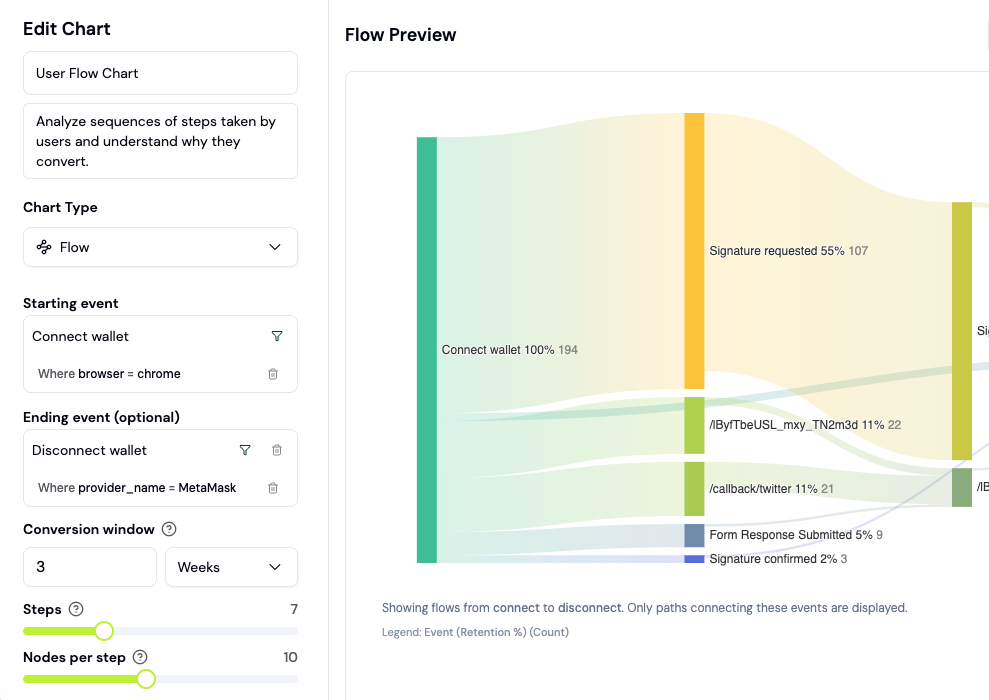 ## Part 2: Configure Your Starting Event
In the flow builder, select your **starting event**. Common starting points for onboarding analysis:
* **First page view** (shows the complete user journey from landing)
* **Connect wallet** (shows post-connection paths)
For onboarding analysis, start with the **connect wallet event** to see what happens immediately after users authenticate.
Click the event dropdown and select the event. The flow automatically generates.
## Part 3: Read the Sankey Diagram
The diagram shows:
* **Nodes (circles)**: Pages or events in your flow (e.g., "Swap Page", "Portfolio")
* **Paths (arrows)**: Lines connecting nodes, thickness represents user volume
* **Drop-off (gray paths exiting right)**: Users who left without continuing
Width of paths = number of users. Thicker paths mean more users took that route.
For example: If a connect wallet event flows to "Swap Page" with 500 users, but only 200 complete a swap, you have a 60% conversion rate on swaps.
## Part 4: Analyze Forward Paths
Forward paths answer: "What did users do after this step?"
Example questions:
* After connecting their wallet, how many users visited the portfolio page?
* Of those who visited the portfolio, how many completed a transaction?
* What's the most common second step after landing?
Click any node to highlight all paths flowing from it. The sidebar shows exact conversion percentages.
## Part 5: Filter by User Properties
Click **Filter** to narrow the flow to specific user segments. Filter options:
* **By Device** (mobile vs desktop drop-off patterns)
* **By Country** (geographic patterns)
* **By Browser**
* **By OS**
* **By Referrer** (organic vs paid, specific campaigns)
* **By Referrer URL**
Example: Compare flows for mobile users vs desktop. If mobile has 40% drop-off at wallet connect but desktop has 10%, your mobile UX needs work.
## Part 6: Identify Bottlenecks and Optimization Opportunities
Look for:
1. **Hard Stops**: Nodes where 50%+ users exit (red flag for UX friction)
2. **Unexpected Paths**: Routes most users don't take (may indicate confusion)
3. **Long Paths**: Users going 5+ steps before conversion (simplify)
4. **Device Disparity**: Different conversion rates on mobile vs desktop
For each bottleneck, ask: "What's the friction here? Is it unclear UI? Missing docs? Technical issue?"
Document findings. Prioritize fixes by impact (filter to estimate user volume affected).
## Part 7: Save Flow Chart to Your Dashboard
Once your flow analysis is complete, click **Save to Dashboard**. Choose an existing dashboard or create a new one.
Name the chart clearly: "New User Onboarding Flow" or "Post-Swap Flows".
Saved flows update in real time, so you can track onboarding improvements over time as you ship fixes.
## Real-World Analysis Walkthrough
Imagine your new user onboarding flow shows:
* 100 users land on your app (starting event: first page view)
* 80 connect a wallet (80% conversion)
* 60 visit swap page (75% of wallets)
* 20 complete first swap (33% of swap visitors)
Analysis:
* Wallet connect: Strong (80% is good)
* Swap page visit: Good (75%)
* Swap completion: Weak (33%)
Action: Investigate swap friction. Is the UI confusing? Are gas fees discouraging swaps? A/B test clearer CTA buttons.
After shipping improvements, check the same flow 1 week later. Did swap completion improve to 40%? If yes, rollout the change.
## Measuring Onboarding Success
### Create onboarding segments
Use segments to track users at different onboarding stages:
**Segment 1: Landed but didn't connect**
* Visited page in last 7 days
* Did NOT connect wallet
**Segment 2: Connected but didn't transact**
* Connected wallet in last 7 days
* Did NOT complete transaction
**Segment 3: Completed onboarding**
* Completed transaction in last 7 days
* Is a New User (lifecycle)
### Measure with the onboarding rate formula
```
Onboarding rate = (Completed onboarding / Landed) × 100
```
Monitor this metric daily to track onboarding health.
### The "aha moment" drives retention
Compare retention for different first-session actions:
| First session action | Week 1 retention |
| - | - |
| Only connected wallet | 15% |
| Viewed 3+ pages | 25% |
| Completed transaction | 45% |
**Insight**: Driving users to complete a transaction dramatically improves retention.
### Query onboarding rate with SQL
```sql theme={null}
SELECT
toDate(timestamp) AS date,
countDistinct(CASE WHEN type = 'page' THEN anonymous_id END) AS landed,
countDistinct(CASE WHEN type = 'connect' THEN address END) AS connected,
countDistinct(CASE WHEN type = 'transaction' THEN address END) AS transacted,
round(connected / landed * 100, 1) AS connect_rate,
round(transacted / connected * 100, 1) AS transaction_rate
FROM events
WHERE timestamp >= now() - INTERVAL 30 DAY
GROUP BY date
ORDER BY date
```
### Common onboarding improvements
| Issue | Solution | How to measure |
| - | - | - |
| Low landing to app conversion | Clearer CTA, better messaging | Funnel step 1→2 rate |
| Wallet connect drop-off | Simplify options, add trust signals | Funnel step 2→3 rate |
| High bounce on app page | Improve loading speed, add guidance | Flows showing exits |
| Users don't return | Email/notification follow-up | Week 1 retention |
### A/B test onboarding changes
When you ship changes to improve onboarding:
1. Note the date of the change
2. Compare funnel metrics before and after using date filters on your dashboard
3. Check if retention improved for post-change cohorts using a [Retention chart](/guides/retention)
This lets you measure whether each change actually improved onboarding.
## FAQ
Flows show all possible routes users take, including dropoffs. Funnels measure conversion through a specific sequence of steps. Use flows to discover paths, funnels to measure specific conversions.
Yes. Set a **Conversion window** (value and unit, e.g. 24 hours) in the flow's chart settings to limit how long after the starting event later steps can occur.
Yes, but not the node and path structure itself. Click a node or path to select the users behind it, then export that user list as a CSV. There's no JSON export option. Useful for reporting to stakeholders or further analysis in Excel.
This documentation is built and hosted on [Mintlify](https://mintlify.com), a developer documentation platform.
## Part 2: Configure Your Starting Event
In the flow builder, select your **starting event**. Common starting points for onboarding analysis:
* **First page view** (shows the complete user journey from landing)
* **Connect wallet** (shows post-connection paths)
For onboarding analysis, start with the **connect wallet event** to see what happens immediately after users authenticate.
Click the event dropdown and select the event. The flow automatically generates.
## Part 3: Read the Sankey Diagram
The diagram shows:
* **Nodes (circles)**: Pages or events in your flow (e.g., "Swap Page", "Portfolio")
* **Paths (arrows)**: Lines connecting nodes, thickness represents user volume
* **Drop-off (gray paths exiting right)**: Users who left without continuing
Width of paths = number of users. Thicker paths mean more users took that route.
For example: If a connect wallet event flows to "Swap Page" with 500 users, but only 200 complete a swap, you have a 60% conversion rate on swaps.
## Part 4: Analyze Forward Paths
Forward paths answer: "What did users do after this step?"
Example questions:
* After connecting their wallet, how many users visited the portfolio page?
* Of those who visited the portfolio, how many completed a transaction?
* What's the most common second step after landing?
Click any node to highlight all paths flowing from it. The sidebar shows exact conversion percentages.
## Part 5: Filter by User Properties
Click **Filter** to narrow the flow to specific user segments. Filter options:
* **By Device** (mobile vs desktop drop-off patterns)
* **By Country** (geographic patterns)
* **By Browser**
* **By OS**
* **By Referrer** (organic vs paid, specific campaigns)
* **By Referrer URL**
Example: Compare flows for mobile users vs desktop. If mobile has 40% drop-off at wallet connect but desktop has 10%, your mobile UX needs work.
## Part 6: Identify Bottlenecks and Optimization Opportunities
Look for:
1. **Hard Stops**: Nodes where 50%+ users exit (red flag for UX friction)
2. **Unexpected Paths**: Routes most users don't take (may indicate confusion)
3. **Long Paths**: Users going 5+ steps before conversion (simplify)
4. **Device Disparity**: Different conversion rates on mobile vs desktop
For each bottleneck, ask: "What's the friction here? Is it unclear UI? Missing docs? Technical issue?"
Document findings. Prioritize fixes by impact (filter to estimate user volume affected).
## Part 7: Save Flow Chart to Your Dashboard
Once your flow analysis is complete, click **Save to Dashboard**. Choose an existing dashboard or create a new one.
Name the chart clearly: "New User Onboarding Flow" or "Post-Swap Flows".
Saved flows update in real time, so you can track onboarding improvements over time as you ship fixes.
## Real-World Analysis Walkthrough
Imagine your new user onboarding flow shows:
* 100 users land on your app (starting event: first page view)
* 80 connect a wallet (80% conversion)
* 60 visit swap page (75% of wallets)
* 20 complete first swap (33% of swap visitors)
Analysis:
* Wallet connect: Strong (80% is good)
* Swap page visit: Good (75%)
* Swap completion: Weak (33%)
Action: Investigate swap friction. Is the UI confusing? Are gas fees discouraging swaps? A/B test clearer CTA buttons.
After shipping improvements, check the same flow 1 week later. Did swap completion improve to 40%? If yes, rollout the change.
## Measuring Onboarding Success
### Create onboarding segments
Use segments to track users at different onboarding stages:
**Segment 1: Landed but didn't connect**
* Visited page in last 7 days
* Did NOT connect wallet
**Segment 2: Connected but didn't transact**
* Connected wallet in last 7 days
* Did NOT complete transaction
**Segment 3: Completed onboarding**
* Completed transaction in last 7 days
* Is a New User (lifecycle)
### Measure with the onboarding rate formula
```
Onboarding rate = (Completed onboarding / Landed) × 100
```
Monitor this metric daily to track onboarding health.
### The "aha moment" drives retention
Compare retention for different first-session actions:
| First session action | Week 1 retention |
| - | - |
| Only connected wallet | 15% |
| Viewed 3+ pages | 25% |
| Completed transaction | 45% |
**Insight**: Driving users to complete a transaction dramatically improves retention.
### Query onboarding rate with SQL
```sql theme={null}
SELECT
toDate(timestamp) AS date,
countDistinct(CASE WHEN type = 'page' THEN anonymous_id END) AS landed,
countDistinct(CASE WHEN type = 'connect' THEN address END) AS connected,
countDistinct(CASE WHEN type = 'transaction' THEN address END) AS transacted,
round(connected / landed * 100, 1) AS connect_rate,
round(transacted / connected * 100, 1) AS transaction_rate
FROM events
WHERE timestamp >= now() - INTERVAL 30 DAY
GROUP BY date
ORDER BY date
```
### Common onboarding improvements
| Issue | Solution | How to measure |
| - | - | - |
| Low landing to app conversion | Clearer CTA, better messaging | Funnel step 1→2 rate |
| Wallet connect drop-off | Simplify options, add trust signals | Funnel step 2→3 rate |
| High bounce on app page | Improve loading speed, add guidance | Flows showing exits |
| Users don't return | Email/notification follow-up | Week 1 retention |
### A/B test onboarding changes
When you ship changes to improve onboarding:
1. Note the date of the change
2. Compare funnel metrics before and after using date filters on your dashboard
3. Check if retention improved for post-change cohorts using a [Retention chart](/guides/retention)
This lets you measure whether each change actually improved onboarding.
## FAQ
Flows show all possible routes users take, including dropoffs. Funnels measure conversion through a specific sequence of steps. Use flows to discover paths, funnels to measure specific conversions.
Yes. Set a **Conversion window** (value and unit, e.g. 24 hours) in the flow's chart settings to limit how long after the starting event later steps can occur.
Yes, but not the node and path structure itself. Click a node or path to select the users behind it, then export that user list as a CSV. There's no JSON export option. Useful for reporting to stakeholders or further analysis in Excel.
This documentation is built and hosted on [Mintlify](https://mintlify.com), a developer documentation platform.