> ## Documentation Index
> Fetch the complete documentation index at: https://docs.formo.so/llms.txt
> Use this file to discover all available pages before exploring further.
# Web
> Install and configure the Formo Web SDK to track page views, wallet connects, transactions, and custom events in your website or web app.
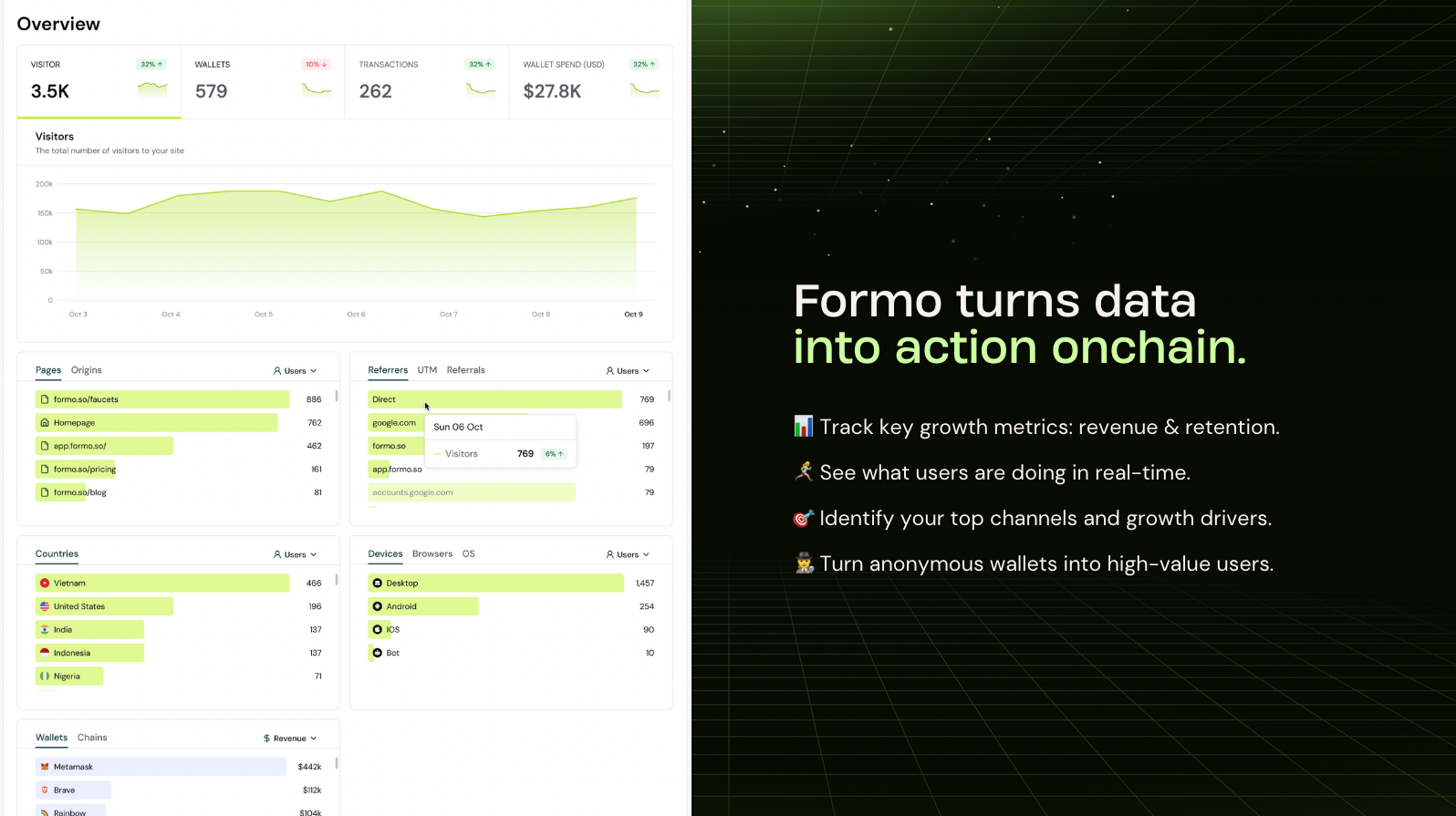 The Formo Web SDK is [open source](https://github.com/getformo/sdk) and implements the standard [Events API](/data/events/overview#events-api).
## Installation
Use this pre-built prompt to get started faster: [Install Formo with AI](/install#install-with-ai).
There are several ways to install the Formo SDK:
* [Wagmi](#wagmi) is recommended for EVM apps
* [Solana](#solana-integration) for Solana apps
* [HTML Snippet](#html-snippet) is recommended for static websites
* [React & Next.js (without Wagmi)](#react--nextjs-without-wagmi)
* [Angular](#angular) for Angular apps using the bare EIP-1193 provider
We recommend installing Formo on **both your website (example.com) and your app (app.example.com)** on the same project with the same SDK write key.
The standard setup is to use the HTML snippet on your website and Wagmi on your app, with [cross-subdomain tracking](#cross-subdomain-tracking) enabled.
### Wagmi
If you're already using [Wagmi](https://wagmi.sh), this is the recommended way to install Formo for apps.
When `wagmi` options are provided, the SDK hooks directly into Wagmi's state management instead of wrapping EIP-1193 providers. This provides:
* Native event handling via Wagmi's built-in state system
* Better compatibility with wallet connection libraries (RainbowKit, ConnectKit, etc.)
* Full tracking of signatures and transactions via TanStack Query's mutation cache
Note that transaction and signature autocapture requires the use of [wagmi React hooks](#wagmi-integration). If your app also sends imperatively through viem (`walletClient.sendTransaction`, `.signMessage`, `.writeContract`), those calls create no wagmi mutation and are not captured by default; opt in with `wagmi: { eip1193Fallback: true }` (SDK 1.38.0+) and the SDK instruments the active connector's provider with the same request wrapper the default mode uses. Hook-driven calls are never double-counted. The flag is off by default so wagmi mode never touches the signing transport without an explicit, auditable decision.
Install the Web SDK via NPM.
```bash theme={null}
npm install @formo/analytics --save
```
```tsx theme={null}
// App.tsx
import { WagmiProvider, createConfig, http } from 'wagmi';
import { QueryClient, QueryClientProvider } from '@tanstack/react-query';
import { FormoAnalyticsProvider } from '@formo/analytics';
import { mainnet } from 'wagmi/chains';
const wagmiConfig = createConfig({
chains: [mainnet],
transports: {
[mainnet.id]: http(),
},
});
const queryClient = new QueryClient();
function App() {
return (
);
}
```
### HTML Snippet
Install this snippet at the `` of your website:
```html theme={null}
```
Enable [Subresource Integrity (SRI)](/security/sri) to improve site security.
### React & Next.js (without Wagmi)
Use [Wagmi](#wagmi) for more reliable and secure event tracking.
Install the Web SDK via NPM.
```bash theme={null}
npm install @formo/analytics --save
```
```tsx theme={null}
// App.tsx (or App.js)
import { FormoAnalyticsProvider } from '@formo/analytics';
const root = ReactDOM.createRoot(document.getElementById('root') as HTMLElement);
root.render(
);
```
```tsx theme={null}
// Usage on a page component
import { useFormo } from '@formo/analytics';
const HomePage = () => {
const analytics = useFormo();
useEffect(() => {
// Track a custom event
analytics.track('Swap Completed', { points: 100 });
}, [analytics]);
return
The Formo Web SDK is [open source](https://github.com/getformo/sdk) and implements the standard [Events API](/data/events/overview#events-api).
## Installation
Use this pre-built prompt to get started faster: [Install Formo with AI](/install#install-with-ai).
There are several ways to install the Formo SDK:
* [Wagmi](#wagmi) is recommended for EVM apps
* [Solana](#solana-integration) for Solana apps
* [HTML Snippet](#html-snippet) is recommended for static websites
* [React & Next.js (without Wagmi)](#react--nextjs-without-wagmi)
* [Angular](#angular) for Angular apps using the bare EIP-1193 provider
We recommend installing Formo on **both your website (example.com) and your app (app.example.com)** on the same project with the same SDK write key.
The standard setup is to use the HTML snippet on your website and Wagmi on your app, with [cross-subdomain tracking](#cross-subdomain-tracking) enabled.
### Wagmi
If you're already using [Wagmi](https://wagmi.sh), this is the recommended way to install Formo for apps.
When `wagmi` options are provided, the SDK hooks directly into Wagmi's state management instead of wrapping EIP-1193 providers. This provides:
* Native event handling via Wagmi's built-in state system
* Better compatibility with wallet connection libraries (RainbowKit, ConnectKit, etc.)
* Full tracking of signatures and transactions via TanStack Query's mutation cache
Note that transaction and signature autocapture requires the use of [wagmi React hooks](#wagmi-integration). If your app also sends imperatively through viem (`walletClient.sendTransaction`, `.signMessage`, `.writeContract`), those calls create no wagmi mutation and are not captured by default; opt in with `wagmi: { eip1193Fallback: true }` (SDK 1.38.0+) and the SDK instruments the active connector's provider with the same request wrapper the default mode uses. Hook-driven calls are never double-counted. The flag is off by default so wagmi mode never touches the signing transport without an explicit, auditable decision.
Install the Web SDK via NPM.
```bash theme={null}
npm install @formo/analytics --save
```
```tsx theme={null}
// App.tsx
import { WagmiProvider, createConfig, http } from 'wagmi';
import { QueryClient, QueryClientProvider } from '@tanstack/react-query';
import { FormoAnalyticsProvider } from '@formo/analytics';
import { mainnet } from 'wagmi/chains';
const wagmiConfig = createConfig({
chains: [mainnet],
transports: {
[mainnet.id]: http(),
},
});
const queryClient = new QueryClient();
function App() {
return (
);
}
```
### HTML Snippet
Install this snippet at the `` of your website:
```html theme={null}
```
Enable [Subresource Integrity (SRI)](/security/sri) to improve site security.
### React & Next.js (without Wagmi)
Use [Wagmi](#wagmi) for more reliable and secure event tracking.
Install the Web SDK via NPM.
```bash theme={null}
npm install @formo/analytics --save
```
```tsx theme={null}
// App.tsx (or App.js)
import { FormoAnalyticsProvider } from '@formo/analytics';
const root = ReactDOM.createRoot(document.getElementById('root') as HTMLElement);
root.render(
);
```
```tsx theme={null}
// Usage on a page component
import { useFormo } from '@formo/analytics';
const HomePage = () => {
const analytics = useFormo();
useEffect(() => {
// Track a custom event
analytics.track('Swap Completed', { points: 100 });
}, [analytics]);
return Welcome to the Home Page!
;
};
export default HomePage;
```
### Angular
`FormoAnalyticsProvider` and `useFormo()` are React-only. Angular apps import from the React-free `@formo/analytics/core` subpath and wrap `FormoAnalytics.init()` in an injectable service, with wallets connected over the bare EIP-1193 provider (`window.ethereum`). Full working example: [with-angular](https://github.com/getformo/examples/tree/main/with-angular).
Install the Web SDK along with the `buffer` polyfill. Angular's esbuild build doesn't auto-polyfill Node globals, but the SDK uses `Buffer` to decode signed-message payloads. Without it, signing throws `ReferenceError: Buffer is not defined`.
```bash theme={null}
npm install @formo/analytics buffer viem --save
```
```ts theme={null}
// src/polyfills.ts
import { Buffer } from 'buffer';
(globalThis as unknown as { Buffer?: typeof Buffer }).Buffer ??= Buffer;
```
```jsonc theme={null}
// angular.json (build > options)
{
"polyfills": ["src/polyfills.ts"],
"allowedCommonJsDependencies": ["viem"]
}
```
Wrap `FormoAnalytics.init()` in an injectable service. Import from `@formo/analytics/core`; the root entry pulls in the React provider, which Angular doesn't need:
```ts theme={null}
// src/app/services/formo-analytics.service.ts
import { Injectable } from '@angular/core';
import { FormoAnalytics } from '@formo/analytics/core';
import type { IFormoAnalytics, IFormoEventProperties } from '@formo/analytics/core';
@Injectable({ providedIn: 'root' })
export class FormoAnalyticsService {
private analytics: IFormoAnalytics | null = null;
async init(): Promise {
if (typeof window === 'undefined') return;
this.analytics = await FormoAnalytics.init('', {
autocapture: { connect: true, disconnect: true, chain: true, signature: true, transaction: true },
});
}
identify(address: string): void {
void this.analytics?.identify({ address });
}
track(event: string, properties?: IFormoEventProperties): void {
void this.analytics?.track(event, properties);
}
}
```
Initialize it with `provideAppInitializer` so the SDK's autocapture wraps `window.ethereum` **before** any wallet interaction:
```ts theme={null}
// src/app/app.config.ts
import { ApplicationConfig, inject, provideAppInitializer } from '@angular/core';
import { provideRouter } from '@angular/router';
import { routes } from './app.routes';
import { FormoAnalyticsService } from './services/formo-analytics.service';
export const appConfig: ApplicationConfig = {
providers: [
provideRouter(routes),
provideAppInitializer(() => inject(FormoAnalyticsService).init()),
],
};
```
## Identify users
Call [`identify()`](/data/events/identify) after a user connects their wallet or signs in on your website or app:
```ts theme={null}
analytics.identify({ address });
OR
window.formo.identify(...);
```
If no parameters are specified, the Formo SDK will attempt to auto-identify the wallet address.
Call `identify()` in a `useEffect` that triggers when the wallet address changes:
```tsx theme={null}
import { useFormo } from '@formo/analytics';
import { useAccount } from 'wagmi';
import { useEffect } from 'react';
function App() {
const { address } = useAccount();
const analytics = useFormo();
useEffect(() => {
if (address && analytics) {
analytics.identify({ address });
}
}, [address, analytics]);
}
```
A Privy user is one account (a DID) with many linked wallets. Pass the `usePrivy()` user straight to `identify()` and the SDK identifies **every** linked wallet under that user's DID, so they cluster into a single user instead of one per address:
```tsx theme={null}
import { useFormo } from '@formo/analytics';
import { usePrivy } from '@privy-io/react-auth';
import { useAccount } from 'wagmi';
import { useEffect } from 'react';
function App() {
const { user } = usePrivy(); // null when the session isn't a Privy one
const { address } = useAccount(); // plain wallet sessions
const formo = useFormo();
useEffect(() => {
if (!formo) return;
// Check `user` first: a Privy session usually also has a wagmi
// address, so testing the address first would lose the clustering.
if (user) {
formo.identify(user);
} else if (address) {
formo.identify({ address });
}
}, [user, address, formo]);
}
```
`user` is reactive, so this re-runs on login and on every link/unlink.
See [Privy integration](#privy-integration) below for what each wallet sends and how mixed Privy/non-Privy apps identify.
```html theme={null}
```
Inject the analytics service and call `identify()` from the same place you discover the wallet address:
```ts theme={null}
import { Injectable, inject, signal } from '@angular/core';
import { FormoAnalyticsService } from './services/formo-analytics.service';
import type { Address } from 'viem';
@Injectable({ providedIn: 'root' })
export class WalletService {
private readonly formo = inject(FormoAnalyticsService);
readonly address = signal(null);
async connect(): Promise {
const [account] = await window.ethereum!.request({ method: 'eth_requestAccounts' });
this.address.set(account);
this.formo.identify(account);
}
}
```
See the [with-angular example](https://github.com/getformo/examples/tree/main/with-angular) for a full working example.
## Track events
> The Web SDK automatically captures common events such as page views and wallet events (connect, disconnect, signature, transaction, etc.) with full attribution (referrer, UTM, referrals). You do not need to manually track them.
To track custom events (in-app user actions, key conversions) use the [`track`](/data/events/track) function with details of what happened:
```ts theme={null}
import { useFormo } from '@formo/analytics';
const analytics = useFormo();
analytics.track("Position Opened", // custom event name
{ // custom event properties
pool_id: "LINK/ETH", // custom event property
amount: "1200", // custom event property
volume: -59.99, // volume (reserved property, can be positive or negative to track outflows)
revenue: 99.99, // revenue (reserved property, must be a non-negative number)
}
)
OR
window.formo.track(...)
```
Using a [standardized naming convention](/data/events/track#naming-events) for your custom events is recommended.
You can [track volume, revenue, and points](/data/events/track#tracking-volume-revenue-points) in custom events.
To make a business-critical event safe to retry, pass the reserved [`idempotency_key`](/data/events/track#deduplicating-events) property.
## Code examples
examples/with-privy
examples/with-dynamic
examples/with-turnkey
examples/with-react
examples/with-next-app-router
examples/with-next-page-router
examples/with-metamask
examples/with-thirdweb
examples/with-reown
examples/with-crossmint
examples/with-openfort
examples/with-tempo
examples/with-angular
examples/with-solana
examples/with-react-native
## Configuration
### Local testing
The SDK skips tracking on localhost by default.
To enable tracking locally during development, set `tracking` to `true`:
```tsx theme={null}
```
### Logging
Control the level of logs the SDK prints to the console with the following logLevel settings:
```tsx theme={null}
```
Logging is disabled by default (`logger.enabled: false`); no logs print unless you explicitly set `logger.enabled: true`. The `levels` array is matched exactly, not hierarchically: setting `levels: ["warn"]` shows only `warn` messages, not `warn` and `error` together. List every level you want to see.
| Log Level | Description |
| - | - |
| trace | Shows the most detailed diagnostic information, useful for tracing program execution flow. |
| debug | Shows all messages, including function context information for each public method the SDK invokes. |
| info | Shows informative messages about normal application operation. |
| warn | Shows warning messages. |
| error | Shows error messages. |
### Autocapture
You can configure which wallet events are automatically captured by the SDK:
```javascript theme={null}
// Enable full autocapture (default)
const analytics = await FormoAnalytics.init('YOUR_API_KEY', {
autocapture: true
});
// Disable autocapture for signature and transaction events
const analytics = await FormoAnalytics.init('YOUR_API_KEY', {
autocapture: {
connect: true,
disconnect: true,
signature: false, // Disable signature tracking
transaction: false, // Disable transaction tracking
chain: true
}
});
// Disable all autocapture
const analytics = await FormoAnalytics.init('YOUR_API_KEY', {
autocapture: false
});
```
### Web vitals
The Web SDK can measure the [Core Web Vitals](https://web.dev/articles/vitals) from real visitors: LCP, INP, CLS, FCP, and TTFB. It uses Google's [`web-vitals`](https://github.com/GoogleChrome/web-vitals) library. The Overview page shows each metric as a percentile (P90 by default; P50, P75 and P99 available), its trend over time, and a breakdown by page, device, and country.
Web vitals are off until you pass the library (SDK 1.42.0+, `web-vitals` 5 or later). The SDK does not bundle it, so apps that do not use web vitals do not load it.
```javascript npm theme={null}
// npm install web-vitals
import * as webVitals from 'web-vitals';
const analytics = await FormoAnalytics.init('', {
webVitals
});
```
```tsx Next.js theme={null}
'use client'; // import web-vitals in the client component that builds options
import { FormoAnalyticsProvider } from '@formo/analytics';
import * as webVitals from 'web-vitals';
export function Providers({ children }: { children: React.ReactNode }) {
return (
{children}
);
}
```
```html HTML snippet theme={null}
```
### Batching
To support high-performance environments, the SDK sends events in batches.
```tsx theme={null}
```
Customize this behavior with the `flushAt` and `flushInterval` configuration parameters.
### Ready callback
The `ready` callback function executes once the Formo SDK is fully loaded and ready to use. This is useful for performing initialization tasks or calling SDK methods that require the SDK to be ready.
```tsx theme={null}
```
For Browser installations, you can use the ready callback in the `onload` attribute:
```html theme={null}
```
### Environments
You can control tracking behavior in different environments (test, staging) with the `tracking` option:
```javascript theme={null}
// Initialize with a boolean (simple on/off)
const analytics = await FormoAnalytics.init('your-write-key', {
tracking: true // Enable tracking everywhere, including localhost
});
// Initialize only on production environment
const analytics = await FormoAnalytics.init('your-write-key', {
tracking: ENV === 'production'
});
// Initialize with an object for exclusion rules
const analytics = await FormoAnalytics.init('your-write-key', {
tracking: {
excludeHosts: ['stage-v2.puri.fi'], // Exclude tracking based on window.location.hostname
excludePaths: ['/test', '/debug'], // Exclude tracking based on window.location.pathname
excludeChains: [5], // Exclude tracking on Goerli testnet (5)
excludeTimezones: ['Asia/Bangkok', 'America/New_York'] // Exclude visitors whose browser timezone matches
}
});
```
Specify exact hostnames and exact paths in exclusion lists.
| Option | Type | Default | Description |
| - | - | - | - |
| `excludeHosts` | `string[]` | `[]` | Exact hostnames (`window.location.hostname`) to exclude from tracking. |
| `excludePaths` | `string[]` | `[]` | Exact paths (`window.location.pathname`) to exclude from tracking. |
| `excludeChains` | `ChainID[]` | `[]` | Chain IDs to exclude from tracking. |
| `excludeTimezones` | `string[]` | `[]` | IANA timezone names (e.g. `Asia/Bangkok`) to opt out of tracking entirely. |
| `excludeQueryParams` | `string[]` | `[]` | Query parameter names to strip from captured URLs before any event is sent. |
#### Excluding by timezone
When the visitor's browser-resolved timezone (via `Intl.DateTimeFormat().resolvedOptions().timeZone`) matches an entry in `excludeTimezones`, the SDK suppresses tracking entirely for that visitor.
No events are enqueued or sent, including `identify` and `connect`, and no identity cookie is written. This is useful for opting whole regions out of analytics (for example, to honor a jurisdiction's privacy expectations).
#### Excluding query parameters
Formo automatically captures the page URL, query string, individual query-parameter properties, and the referrer.
If your URLs carry sensitive data (auth tokens, one-time codes, emails), use `tracking.excludeQueryParams` to strip those parameters in the browser, before any event is sent so they are never transmitted or stored:
```tsx theme={null}
{children}
```
These parameters are applied on top of an always-on built-in denylist that cannot be disabled. The following parameters are always stripped, regardless of configuration:
* `privy_oauth_code`: Privy OAuth authorization code
* `privy_oauth_state`: Privy OAuth CSRF state token
* `privy_oauth_provider`: Privy OAuth provider identifier
Excluded parameters are removed from the `url`, `query`, `referrer`, and other event properties. Matching is case-insensitive.
### Consent management
The Formo Web SDK includes simplified consent management functionality to help you comply with privacy regulations like GDPR, CCPA, and ePrivacy Directive.
Control user tracking preferences with simple opt-out and opt-in methods:
```javascript theme={null}
import { useFormo } from '@formo/analytics';
const analytics = useFormo();
// Check if user has opted out of tracking
console.log(analytics.hasOptedOutTracking())
// If user has not opted out, tracking is enabled
analytics.track('page_view');
// Opt out of tracking (stops all tracking for the user)
analytics.optOutTracking();
// Opt back into tracking (re-enables tracking for the user)
analytics.optInTracking();
```
For browser installations:
```javascript theme={null}
// Manage consent
window.formo.optOutTracking();
window.formo.optInTracking();
```
### Cross subdomain tracking
By default, Formo sets identity cookies on the root domain, sharing visitor identity across all subdomains. This ensures accurate visitor counts and consistent attribution across your subdomains out of the box.
| Value | Behavior |
| - | - |
| `true` (default) | Cookies are set on the root domain (e.g. `.example.com`), sharing visitor identity across all subdomains. |
| `false` | Cookies are scoped to the current hostname only. A cookie set on `app.example.com` is **not** visible from `www.example.com`. |
With the default `crossSubdomainCookies` setting:
* **Cross subdomain tracking**: track users as they move between your marketing site, app, docs, and other subdomains.
* **Accurate attribution**: attribute conversions to the correct channel, even when users cross subdomains.
* **Automatic migration**: the SDK migrates existing host-scoped cookies to the apex domain so visitors are not double-counted.
To disable cross-subdomain tracking and scope cookies to the current hostname only, set `crossSubdomainCookies` to `false`:
```html theme={null}
```
```tsx theme={null}
```
```javascript theme={null}
const analytics = await FormoAnalytics.init('YOUR_API_KEY', {
crossSubdomainCookies: false
});
```
### Referrer URL tracking
Referrer URL tracking lets you understand the specific URL where your users are coming from, as long as the site has the correct `Referer-Policy` header set.
We recommend setting the `no-referrer-when-downgrade` policy, which will only send the domain, path, and query parameters to the destination URL as long as the protocol security level stays the same (i.e. `HTTP` → `HTTP`, or `HTTPS` → `HTTPS`).
If the protocol security level is downgraded (i.e. `HTTPS` → `HTTP`), the referrer will not be sent. This is a good compromise to make sure your users' privacy is respected while still getting a good amount of data.
Here's how to configure this:
If you are using Next.js, you can use the headers property in your `next.config.js` file to configure the referrer policy:
```javascript theme={null}
module.exports = {
async headers() {
return [
{
source: "/:path*",
headers: [
{
key: "Referrer-Policy",
value: "no-referrer-when-downgrade",
},
],
},
];
},
};
```
You can set the referrer policy using a meta tag in the `` section of your HTML:
```html theme={null}
```
### Referrals
Formo autodetects `ref`, `referral`, `refcode`, `af`, and `referrer` query parameters in the URL. You can customize how referrals are detected by the SDK:
```tsx theme={null}
```
In the above configuration, Formo will detect referrals from:
* the `via` and `ref` query parameters in the URL, and
* from the `/referral/([^/]+)` path pattern
### Wagmi integration
For apps using [Wagmi](https://wagmi.sh), enable native integration by providing the Wagmi config and QueryClient:
```tsx theme={null}
```
Transaction and signature autocapture requires the use of [wagmi React hooks](https://wagmi.sh/react/api/hooks) (`useWriteContract`, `useSendTransaction`, `useSignMessage`). Calls via `@wagmi/core` or viem directly bypass the mutation cache and won't be tracked. If you are not using these hooks, use the non-wagmi React or Next.js installation methods instead.
When Wagmi mode is enabled, the SDK:
* Hooks directly into Wagmi's state management for connection events
* Uses TanStack Query's mutation cache for signature and transaction tracking
* Skips EIP-1193 provider wrapping (no proxy behavior)
| Event Type | Without QueryClient | With QueryClient |
| - | - | - |
| Connect | ✅ Tracked | ✅ Tracked |
| Disconnect | ✅ Tracked | ✅ Tracked |
| Chain Change | ✅ Tracked | ✅ Tracked |
| Signatures | ❌ Not tracked | ✅ Tracked |
| Transactions | ❌ Not tracked | ✅ Tracked |
Use the same `QueryClient` instance for both Wagmi and Formo to avoid creating multiple cache instances.
### Solana integration
* **[framework-kit](#solana-with-framework-kit) (Recommended)**: pass its store for wallet, cluster, and recorded transaction lifecycle events.
* **[Solana Kit](#solana-kit)**: wallet `detect`, `connect`, and `disconnect` are autocaptured through Wallet Standard without a store.
`@solana/kit` and framework-kit are different projects. Solana Kit provides the core client and plugins; framework-kit provides the separate `@solana/client` and `@solana/react-hooks` packages and is built on top of Kit.
#### Solana with framework-kit
For Solana dapps, use framework-kit (`@solana/client`) and pass `client.store`. Wallet events hand off to the store without double-counting, while the store adds cluster switches and transactions recorded in it. React transaction hooks do not write to the store and still need [explicit tracking](#manually-tracking-solana-transactions-and-signatures).
See the focused [framework-kit example](https://github.com/getformo/examples/tree/main/with-solana-framework-kit).
```bash theme={null}
npm install @formo/analytics @solana/client @solana/react-hooks
```
Pass `client.store` in the Solana options. This adds network changes and transactions recorded in the store; hook-based transactions still need explicit tracking.
```tsx theme={null}
import { createClient, autoDiscover } from '@solana/client';
import { SolanaProvider } from '@solana/react-hooks';
import { FormoAnalyticsProvider } from '@formo/analytics';
const client = createClient({
cluster: 'devnet',
walletConnectors: autoDiscover(),
});
function App() {
return (
);
}
```
Then use the `useFormo` hook in any component:
```tsx theme={null}
import { useFormo } from '@formo/analytics';
function MyComponent() {
const formo = useFormo();
const handleClick = () => {
formo.track('Swap Started', { pair: 'ETH/USDC' });
};
}
```
If you're not using React or need manual control, call `FormoAnalytics.init()` directly:
```tsx theme={null}
import { createClient, autoDiscover } from '@solana/client';
import { FormoAnalytics } from '@formo/analytics';
const client = createClient({
cluster: 'devnet',
walletConnectors: autoDiscover(),
});
const formo = await FormoAnalytics.init('', {
evm: false,
solana: {
store: client.store,
},
});
```
**Autocaptured events**
The following events are autocaptured via zustand store subscription:
| Event | Trigger |
| - | - |
| Connect | Wallet connects via `useWalletConnection().connect()` |
| Disconnect | Wallet disconnects |
| Chain change | Cluster/network switches via `setCluster()` |
| Transaction | Started, broadcasted, confirmed, reverted, or rejected, for transactions framework-kit records in the store (see the note on hooks [below](#manually-tracking-solana-transactions-and-signatures)) |
Wallet `detect` events still come from Wallet Standard discovery.
#### Solana Kit
If your app uses Solana Kit directly, give Formo the same cluster. Formo observes Wallet Standard independently, so it does not need the Kit client or a store.
```bash theme={null}
npm install @formo/analytics @solana/kit @solana/kit-plugin-rpc @solana/kit-plugin-wallet @solana/react
```
```tsx theme={null}
'use client';
import { createClient } from '@solana/kit';
import { solanaRpc } from '@solana/kit-plugin-rpc';
import { walletSigner } from '@solana/kit-plugin-wallet';
import { ClientProvider } from '@solana/react';
import { FormoAnalyticsProvider } from '@formo/analytics';
const client = createClient()
.use(walletSigner({ chain: 'solana:devnet' }))
.use(solanaRpc({ rpcUrl: 'https://api.devnet.solana.com' }));
function App({ children }) {
return (
{children}
);
}
```
See the complete [Solana Kit example](https://github.com/getformo/examples/tree/main/with-solana).
#### Other Wallet Standard integrations
The SDK observes [Wallet Standard](https://github.com/wallet-standard/wallet-standard) account changes without wrapping wallet methods or adding a Solana dependency.
```bash theme={null}
npm install @formo/analytics --save
```
This `@solana/wallet-adapter-react` example needs only `FormoAnalyticsProvider`. Discovery works whenever the connected wallet registers with the page through Wallet Standard:
```tsx theme={null}
import { ConnectionProvider, WalletProvider } from '@solana/wallet-adapter-react';
import { FormoAnalyticsProvider } from '@formo/analytics';
function App() {
return (
);
}
```
**Autocaptured events**
| Event | Trigger |
| - | - |
| Detect | A wallet registers with the page |
| Connect | The wallet authorizes an account, including a session restored on page load |
| Disconnect | The wallet revokes its accounts |
| Chain change | `formo.solana.setCluster()` is called while a wallet is connected |
**Cluster**
Wallet Standard does not expose your app's active cluster, only the clusters a wallet supports. Formo reports `mainnet-beta` when the wallet supports it, and otherwise the first Solana cluster the wallet lists. Set non-mainnet apps explicitly:
```tsx theme={null}
options={{ evm: false, solana: { cluster: 'devnet' } }}
```
For runtime switches, call `formo.solana.setCluster('devnet')`. This also emits a `chain` event. See [manual transaction and signature tracking](#manually-tracking-solana-transactions-and-signatures).
#### Wallets without Wallet Standard
Most Solana wallets require no manual connection tracking. If a custom or legacy wallet does not publish Wallet Standard account changes, call `formo.connect()` and `formo.disconnect()` when its state changes.
Use `formo.connect()` for wallet connections. `formo.track('Connect', ...)` creates a custom event and does not populate wallet connection analytics.
Emit `connect` from wallet state, including restored sessions, and `disconnect` when the account is revoked:
```tsx theme={null}
import { SOLANA_CHAIN_IDS } from '@formo/analytics';
const chainId = SOLANA_CHAIN_IDS['mainnet-beta'];
formo.connect({ chainId, address }, { providerName });
formo.disconnect({ chainId, address });
```
#### Solana chain IDs
Solana has no numeric chain ID, so Formo maps each cluster to a reserved ID above 900000 to avoid colliding with EVM chains. Use the exported constant rather than hardcoding the number.
| Cluster | `SOLANA_CHAIN_IDS` value |
| - | - |
| `mainnet-beta` | `900001` |
| `testnet` | `900002` |
| `devnet` | `900003` |
| `localnet` | `900004` |
Mainnet has several spellings: Solana Kit's wallet plugin takes `solana:mainnet`, framework-kit's client takes `mainnet`, and Formo uses `mainnet-beta`. Map between them when deriving one from another.
`connect()` validates the address against the chain ID, so a base58 Solana address paired with an EVM chain ID is rejected. Rejected calls log a warning and emit nothing. Enable logging while integrating so you see them:
```tsx theme={null}
options={{ logger: { enabled: true, levels: ['info', 'warn', 'error'] } }}
```
Connections are also skipped when tracking is suppressed for the visitor, for example by an opt-out or an excluded host, timezone, or path.
#### Manually tracking Solana transactions and signatures
Track Solana Kit signatures and transactions explicitly. Framework-kit transactions are autocaptured only when they are recorded in the supplied store; its React hooks (`useSolTransfer`, `useSendTransaction`, `useTransactionPool`) do not write to that store.
```tsx theme={null}
import { useFormo, TransactionStatus, SignatureStatus, SOLANA_CHAIN_IDS } from '@formo/analytics';
const formo = useFormo();
// Transactions
formo.transaction({ status: TransactionStatus.STARTED, chainId: SOLANA_CHAIN_IDS['devnet'], address });
const sig = await solTransfer.send({ destination, amount });
formo.transaction({ status: TransactionStatus.CONFIRMED, chainId: SOLANA_CHAIN_IDS['devnet'], address, transactionHash: sig });
// Signatures (signMessage / signTransaction)
formo.signature({ status: SignatureStatus.REQUESTED, chainId: SOLANA_CHAIN_IDS['devnet'], address, message });
const result = await session.signMessage(encoded);
formo.signature({ status: SignatureStatus.CONFIRMED, chainId: SOLANA_CHAIN_IDS['devnet'], address, message });
```
For Solana-only apps, set `evm: false` to disable EVM provider detection (EIP-1193 / EIP-6963). This prevents unnecessary tracking of injected EVM wallets.
### WalletConnect integration
Using Wagmi (RainbowKit, ConnectKit, AppKit, Privy, and most React dapps)? WalletConnect is already tracked through the [Wagmi integration](#wagmi); skip this section. `registerProvider` refuses in Wagmi mode to prevent double-reporting.
The SDK discovers wallets that announce themselves ([EIP-6963](https://eips.ethereum.org/EIPS/eip-6963)) or sit at `window.ethereum`, which covers injected browser wallets only. A WalletConnect provider is different: your app constructs it in code with `EthereumProvider.init(...)`, so the SDK cannot find it on its own. Hand it over with `registerProvider` (SDK 1.38.0+):
```tsx theme={null}
import { EthereumProvider } from '@walletconnect/ethereum-provider';
const provider = await EthereumProvider.init({ projectId, chains: [1] });
formo.registerProvider(provider);
```
* Call it as soon as the provider exists, before or after the wallet connects; an already-connected session is adopted on the spot.
* Events name the wallet behind WalletConnect ("Ledger Live", "MetaMask Wallet") from the session's peer metadata.
* Returns `true` when capture works; `false` when it refuses (Wagmi mode, EVM tracking disabled, or not a valid EIP-1193 provider).
* The same call works for any other provider your app constructs rather than discovers; pass `{ name, rdns }` as a second argument to label a custom one.
See the [with-walletconnect example](https://github.com/getformo/examples/tree/main/with-walletconnect) for a complete integration.
### Privy integration
A Privy user is **one account (a DID) with many linked wallets** - an embedded wallet plus any external wallets they connect over time. Because Formo is address-keyed, one person with 8 wallets would otherwise appear as 8 users.
`identify(user)` resolves this in a single call: it expands `user.linkedAccounts` and emits one identify per linked wallet, each tagged with the same Privy DID, so they cluster into one user.
```tsx theme={null}
formo.identify(user);
```
**What each wallet sends.** The shared profile parsed from `user.linkedAccounts` - `privyDid`, `privyCreatedAt`, `email`, `phone`, and socials (X, Discord, GitHub, Farcaster, Google, …) - plus that wallet's own `wallet_client`, `chain_type`, and `is_embedded`.
Linked wallets include `wallet` and `smart_wallet` accounts, plus a `cross_app` account's embedded and smart wallets (e.g. Abstract Global Wallet). Addresses are deduplicated.
**Apps with both Privy and non-Privy users.** Branch on which identity you have, checking `user` first - a Privy session usually also has a wagmi `address`, so testing the address first would send that user down the plain path and lose the clustering:
```tsx theme={null}
useEffect(() => {
if (!formo) return;
if (user) {
formo.identify(user); // every linked wallet, under the DID
} else if (address) {
formo.identify({ address }); // plain wallet connect
}
}, [user, address, formo]);
```
`parsePrivyProperties(user)` returns the same parsed profile and wallet list without emitting, if you want to inspect or display what would be sent.
## Proxy
To handle ad-blockers and privacy browsers, we recommend setting up a reverse proxy.
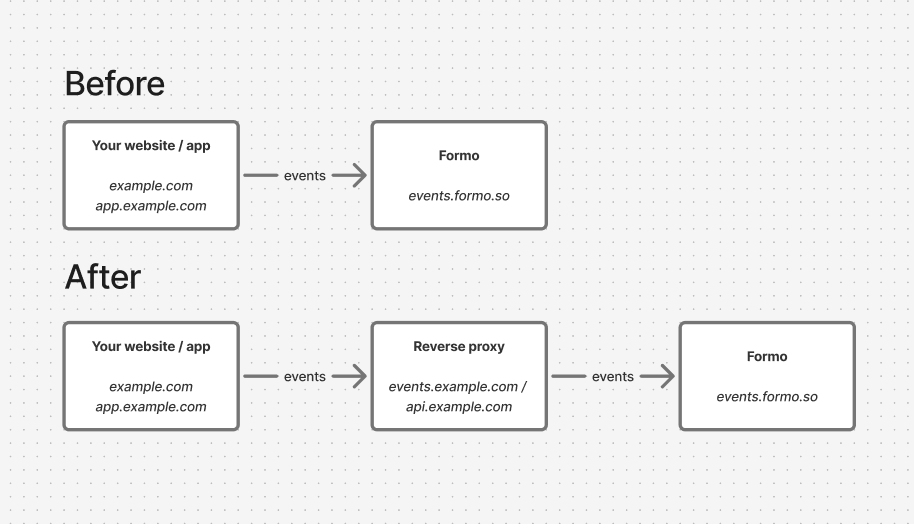 Here are the domains used by Formo to load the SDK and send data:
| Domain | Use case |
| - | - |
| events.formo.so | Receives data from the SDK (`https://events.formo.so/v0/raw_events`) |
| cdn.formo.so | Loads the HTML snippet (only for [Website installation](#html-snippet)) e.g. `https://cdn.formo.so/analytics@latest` |
### CDN
Some ad blockers block specific scripts and API calls based on the domain name and URL.
To address this issue you can download and serve the Formo HTML Snippet from `cdn.formo.so` to your own domain, e.g. `yourdomain.com/formo.js`.
> This only applies to the HTML snippet. If you installed `@formo/analytics` via NPM, the SDK is bundled with your app and is not loaded from the CDN, so you can skip this step.
### Next.js rewrites
If you are using Next.js, you can take advantage of [rewrites](https://nextjs.org/docs/app/api-reference/config/next-config-js/rewrites) to behave like a reverse proxy. To do so, add a `rewrites()` function to your next.config.js file:
```javascript theme={null}
// next.config.js
module.exports = {
async rewrites() {
return [
{
source: "/formo.js",
destination: "https://cdn.formo.so/analytics@latest", // Only for the HTML snippet, skip if you installed via NPM
},
{
source: "/api/ingest",
destination: "https://events.formo.so/v0/raw_events",
},
];
},
};
```
Then, configure the Formo SDK to send requests via your rewrite. Update the `apiHost` parameter in the Formo SDK:
```javascript theme={null}
```
> See an [example Next.js app](https://github.com/getformo/examples/tree/main/with-next-app-router) here.
If you are using the HTML / website snippet, replace the install script with:
```javascript theme={null}
```
### Next.js middleware
If you are using Next.js and rewrites aren't working for you, you can write [custom middleware](https://nextjs.org/docs/14/pages/building-your-application/routing/middleware) to proxy requests to Formo.
Create a file named `middleware.js/ts` in your base directory (same level as the app folder).
```javascript theme={null}
import { NextResponse } from "next/server";
export function middleware(request: any) {
const hostname = "events.formo.so";
const requestHeaders = new Headers(request.headers);
requestHeaders.set("host", hostname);
let url = request.nextUrl.clone();
url.protocol = "https";
url.hostname = hostname;
url.port = 443;
url.pathname = url.pathname.replace(/^\/ingest/, "");
return NextResponse.rewrite(url, {
headers: requestHeaders,
});
}
export const config = {
matcher: "/ingest/:path*",
};
```
In this file, set up code to match requests to a custom route, set a new host header, change the URL to point to Formo, and rewrite the response.
Once done, configure the Formo SDK to send requests via your rewrite:
```javascript theme={null}
```
### Others
Alternatively, you can set up your own proxy (with CloudFront, Cloudflare, etc.) and pass the URL as the SDK `apiHost`:
```javascript theme={null}
```
### Verification
To verify the proxy is working:
* Visit your website / app
* Open the network tab in your browser's developer tools
* Check that analytics requests are going through your domain instead of `events.formo.so`
* Check that events show up in the Activity page on the Formo dashboard
## FAQ
The [Wagmi integration](#wagmi) automatically tracks wallet connects, disconnects, chain switches, transactions, and signatures by hooking into Wagmi's wallet adapter. The standard [React integration](#react--nextjs-without-wagmi) tracks wallet events by wrapping the EIP-1193 wallet provider to track signatures and transactions. Use the Wagmi integration if your app uses Wagmi and its hooks.
Use [formo.track()](/data/events/track) to send custom events with any properties you need. For example: `formo.track('Swap Completed', { pair: 'ETH/USDC', token_in: 'ETH', token_out: 'USDC', amount_in: 1.5 })`. Custom events appear in the [Activity](/features/product-analytics/activity) feed and can be queried in the [Explorer](/features/product-analytics/explore).
Yes. The SDK provides built-in [consent management](#consent-management) with `optOutTracking()` and `optInTracking()` methods. Call `optOutTracking()` to stop all tracking for a user, and `optInTracking()` to re-enable it. Formo does not use third-party cookies, IP addresses, or device fingerprinting, so most jurisdictions do not require a cookie consent banner.
Yes. The SDK includes a dedicated [Privy integration](#privy-integration): pass the `usePrivy()` user to `identify(user)` and every wallet linked to that Privy account is identified under the user's DID, so a multi-wallet user clusters into one Formo user. For other wallet providers, use the standard [React integration](#react--nextjs-without-wagmi). If your wallet provider uses Wagmi under the hood (many do, including Privy), you can also use the [Wagmi integration](#wagmi) for automatic wallet event tracking.
framework-kit is recommended for Solana dapps because its store supplies cluster switches and recorded transaction lifecycle events. It is not required: Wallet Standard still autocaptures `detect`, `connect`, and `disconnect` for compatible wallets used through Solana Kit or other integrations. Signatures and transactions outside the store require explicit tracking.
This documentation is built and hosted on [Mintlify](https://mintlify.com), a developer documentation platform.
Here are the domains used by Formo to load the SDK and send data:
| Domain | Use case |
| - | - |
| events.formo.so | Receives data from the SDK (`https://events.formo.so/v0/raw_events`) |
| cdn.formo.so | Loads the HTML snippet (only for [Website installation](#html-snippet)) e.g. `https://cdn.formo.so/analytics@latest` |
### CDN
Some ad blockers block specific scripts and API calls based on the domain name and URL.
To address this issue you can download and serve the Formo HTML Snippet from `cdn.formo.so` to your own domain, e.g. `yourdomain.com/formo.js`.
> This only applies to the HTML snippet. If you installed `@formo/analytics` via NPM, the SDK is bundled with your app and is not loaded from the CDN, so you can skip this step.
### Next.js rewrites
If you are using Next.js, you can take advantage of [rewrites](https://nextjs.org/docs/app/api-reference/config/next-config-js/rewrites) to behave like a reverse proxy. To do so, add a `rewrites()` function to your next.config.js file:
```javascript theme={null}
// next.config.js
module.exports = {
async rewrites() {
return [
{
source: "/formo.js",
destination: "https://cdn.formo.so/analytics@latest", // Only for the HTML snippet, skip if you installed via NPM
},
{
source: "/api/ingest",
destination: "https://events.formo.so/v0/raw_events",
},
];
},
};
```
Then, configure the Formo SDK to send requests via your rewrite. Update the `apiHost` parameter in the Formo SDK:
```javascript theme={null}
```
> See an [example Next.js app](https://github.com/getformo/examples/tree/main/with-next-app-router) here.
If you are using the HTML / website snippet, replace the install script with:
```javascript theme={null}
```
### Next.js middleware
If you are using Next.js and rewrites aren't working for you, you can write [custom middleware](https://nextjs.org/docs/14/pages/building-your-application/routing/middleware) to proxy requests to Formo.
Create a file named `middleware.js/ts` in your base directory (same level as the app folder).
```javascript theme={null}
import { NextResponse } from "next/server";
export function middleware(request: any) {
const hostname = "events.formo.so";
const requestHeaders = new Headers(request.headers);
requestHeaders.set("host", hostname);
let url = request.nextUrl.clone();
url.protocol = "https";
url.hostname = hostname;
url.port = 443;
url.pathname = url.pathname.replace(/^\/ingest/, "");
return NextResponse.rewrite(url, {
headers: requestHeaders,
});
}
export const config = {
matcher: "/ingest/:path*",
};
```
In this file, set up code to match requests to a custom route, set a new host header, change the URL to point to Formo, and rewrite the response.
Once done, configure the Formo SDK to send requests via your rewrite:
```javascript theme={null}
```
### Others
Alternatively, you can set up your own proxy (with CloudFront, Cloudflare, etc.) and pass the URL as the SDK `apiHost`:
```javascript theme={null}
```
### Verification
To verify the proxy is working:
* Visit your website / app
* Open the network tab in your browser's developer tools
* Check that analytics requests are going through your domain instead of `events.formo.so`
* Check that events show up in the Activity page on the Formo dashboard
## FAQ
The [Wagmi integration](#wagmi) automatically tracks wallet connects, disconnects, chain switches, transactions, and signatures by hooking into Wagmi's wallet adapter. The standard [React integration](#react--nextjs-without-wagmi) tracks wallet events by wrapping the EIP-1193 wallet provider to track signatures and transactions. Use the Wagmi integration if your app uses Wagmi and its hooks.
Use [formo.track()](/data/events/track) to send custom events with any properties you need. For example: `formo.track('Swap Completed', { pair: 'ETH/USDC', token_in: 'ETH', token_out: 'USDC', amount_in: 1.5 })`. Custom events appear in the [Activity](/features/product-analytics/activity) feed and can be queried in the [Explorer](/features/product-analytics/explore).
Yes. The SDK provides built-in [consent management](#consent-management) with `optOutTracking()` and `optInTracking()` methods. Call `optOutTracking()` to stop all tracking for a user, and `optInTracking()` to re-enable it. Formo does not use third-party cookies, IP addresses, or device fingerprinting, so most jurisdictions do not require a cookie consent banner.
Yes. The SDK includes a dedicated [Privy integration](#privy-integration): pass the `usePrivy()` user to `identify(user)` and every wallet linked to that Privy account is identified under the user's DID, so a multi-wallet user clusters into one Formo user. For other wallet providers, use the standard [React integration](#react--nextjs-without-wagmi). If your wallet provider uses Wagmi under the hood (many do, including Privy), you can also use the [Wagmi integration](#wagmi) for automatic wallet event tracking.
framework-kit is recommended for Solana dapps because its store supplies cluster switches and recorded transaction lifecycle events. It is not required: Wallet Standard still autocaptures `detect`, `connect`, and `disconnect` for compatible wallets used through Solana Kit or other integrations. Signatures and transactions outside the store require explicit tracking.
This documentation is built and hosted on [Mintlify](https://mintlify.com), a developer documentation platform.